In 2026, the difference between a good conference and a great one often comes down to the speakers. A powerhouse keynote can energize thousands of attendees, while a technical glitch or last-minute no-show can throw even a seasoned team into chaos. Attendees often decide to attend based on the keynote lineup – your speakers are the star attraction, and selecting captivating keynote speakers for your conference is often the deciding factor for attendees. With in-person conferences back in full swing and budgets rebounding, expectations are sky-high. According to PCMA’s latest industry survey, budgets and attendance have bounced back strongly, but with that comes higher attendee expectations for professional execution, making essential music business conference planning more critical than ever. Speaker management is a high-stakes balancing act: from securing world-class keynotes and coordinating complex schedules to prepping for no-shows and tech issues, veteran organizers know that thorough preparation is key. This hands-on guide draws on decades of experience producing events from 100-person retreats to 30,000+ delegate summits to help you master conference speaker management in 2026. We’ll cover practical strategies for every step – booking and negotiating with speakers, coordinating logistics and AV, and preparing foolproof backup plans – all illustrated with real examples and pro tips. By the end, you’ll be ready to ensure that every speaker, from keynotes to panelists, is well-prepared and that the show goes on smoothly even if surprises occur.
Planning Your Conference Speaker Lineup
Aligning Speakers with Your Theme and Audience
Choosing the right speakers starts with knowing your event’s purpose and audience. A conference’s speaker lineup should reinforce its central theme and address what attendees care about most. Experienced organizers ensure every keynote and session topic ties back to the core question or theme the event is tackling. For example, if you’re organizing a sustainability summit, secure speakers who are authorities in sustainable technology or policy, not just generic big names. The closer a speaker’s expertise aligns with your theme, the more weight and authenticity they’ll bring. Relevance is key: Attendees come seeking specific insights, so book presenters who can deliver exactly that.
Beyond theme fit, consider your audience’s profile and expectations. Corporate executives, developers, academics, and fan communities all have different tastes in speakers. A medical research symposium might prioritise scholarly credibility and CME content, while a music industry conference needs trend-setting artists or execs to inspire creativity. Match speaker style to attendee expectations: do they want high-level inspiration, practical how-to knowledge, or an entertaining experience? In 2026, audiences demand engaging, inclusive content and even a bit of showmanship. Many conference-goers decide whether to attend based on seeing names they know and admire on the lineup. Strive for a mix of star power and substance – marquee names draw people in, but it’s the depth and relevance of talks that keep them satisfied.
Diversity in your speaker lineup is another crucial planning element. Attendees in 2026 expect diverse, inclusive content, and they notice if every speaker comes from the same demographic or background, highlighting the need for mastering convention panel programming in 2026. Aim for representation across gender, ethnicity, geographic region, and perspective. Not only is this the right thing to do, it also makes your content richer and more appealing to a broader audience. For instance, global tech conferences like Web Summit pride themselves on diversity – Web Summit 2022 featured speakers ranging from European prime ministers to Silicon Valley CEOs to Middle Eastern royalty, with over 1,050 speakers spanning 160 countries, demonstrating how a diverse roster enhances the experience. A diverse speaker roster brings a range of viewpoints and draws different attendee groups, enhancing the overall experience. During planning, set diversity goals for your lineup and track them as you confirm speakers. This ensures your stage reflects the audience you want to attract.
Data-Driven Event Marketing
Track ticket sales, demographics, marketing ROI, and social reach in real time. Exportable reports give you the insights to make smarter decisions.
Balancing Keynotes, Panels, and Session Formats
Great conferences offer a balanced programme that mixes session types and formats to keep attendees engaged. In planning your content, think of it like composing a menu – you need a few big “main course” keynotes, plenty of “side dish” breakouts or panels, and maybe an interactive dessert like workshops or live demos. Start by slotting in your major keynotes at strategic times (an energizing opener, a marquee midday speaker to draw a crowd, and a strong closing keynote to finish with impact). Then, plan complementary sessions around them.
Panel discussions, fireside chats, breakout seminars, lightning talks, and workshops each serve different purposes. Panels are great for exploring multiple perspectives and driving conversation (when moderated well), while workshops or roundtables can provide hands-on learning and networking. Pay attention to pacing: too many back-to-back lectures can fatigue an audience, so alternate high-energy keynotes with interactive or networking sessions. For example, you might follow a 60-minute keynote with shorter breakout sessions or a coffee break to let people digest insights. Many conferences find success by dedicating mornings to big keynotes and afternoons to multi-track breakouts, concluding each day with a lighter or inspirational talk.
Ready to Sell Tickets?
Create professional event pages with built-in payment processing, marketing tools, and real-time analytics.
Critically, avoid scheduling conflicts that force your audience to choose between equally important content. This is a major puzzle for multi-track events. Use attendee persona research to stagger popular topics (so two must-see sessions for the same demographic aren’t concurrent). Also coordinate internally to ensure the same speaker isn’t booked in two places at once! Modern scheduling software or even careful spreadsheets can help map out tracks side by side. Veteran organizers recommend color-coding tracks or using tools to flag conflicts so nothing slips through the cracks. As one guide notes, juggling multi-track programming across dozens of rooms without speaker conflicts is an art, requiring organizers to look beyond the main stage when programming panels. If you anticipate a high-profile speaker will draw a big crowd, don’t pit another star against them in the same time slot. Instead, schedule lesser-known or niche sessions opposite blockbusters, or provide repeat sessions/content on demand for highly popular topics. Thoughtful scheduling ensures attendees aren’t frustrated by missing out, and it showcases your speakers to the largest possible relevant audience.
Vetting and Researching Potential Speakers
Once you have a clear picture of the types of sessions and content you need, it’s time to identify and vet potential speakers. Start by making a “long list” of candidates for each major slot. Look at past events in your industry – which speakers consistently wow audiences there? For a marketing conference, this might be influential CMOs or bestselling authors; for a developer summit, perhaps tech CTOs or open-source project leaders. Also consider rising stars in the field, not just household names. Sometimes an emerging expert or dynamic young founder can deliver a fresher, more exciting talk (and often at a fraction of the speaking fee of a celebrity). A savvy approach is to balance big-name headliners with new voices, akin to selecting captivating keynote speakers for a music festival lineup. This mix gives your agenda both drawing power and originality.
Due diligence is essential before you send out invitations or sign any speaker. Research each speaker’s background, presentation style, and reputation. Watch videos of their past talks if available – is their speaking style engaging? Do they stay on message? Reading transcripts or articles by the speaker can also reveal if their perspective fits your event’s tone. Verify credentials: if someone is presented as an expert, ensure their achievements back it up (especially for academic or science conferences, check for proper qualifications and that their work is respected). It’s also wise to quietly ask past event organizers about their experience with that speaker. Were they professional to work with? Did they attract good feedback from attendees? This behind-the-scenes insight can save you from unpleasant surprises.
Be mindful of any potential controversies or sensitivities around a speaker. In the age of social media, a speaker’s off-stage behavior or statements can quickly become an issue for your event’s PR. Do a basic scan for any red flags – for example, have they been embroiled in notable industry disputes or made remarks that could alienate part of your audience? Booking a speaker with a polarising reputation isn’t off-limits, but you should go in prepared. (For instance, if you invite a famously provocative figure, have a plan for moderating Q&A and a communication strategy in case they stir backlash.) Careful vetting means by the time you confirm a speaker, you are confident they will both deliver value onstage and uphold your event’s standards offstage.
Smooth Entry With Mobile Check-In
Scan tickets and manage entry with our mobile check-in app. Supports photo ID verification, real-time capacity tracking, and multi-gate coordination.
Designing a Speaker Management Timeline
Coordinating speakers requires working on multiple parallel timelines, from early outreach down to on-site minutiae. Creating a speaker management timeline helps ensure nothing falls through the cracks. Below is a high-level timeline of key speaker management tasks as you count down to the conference:
| Timeline (Before Event) | Key Speaker Management Tasks |
|---|---|
| 6–12+ months out | Define conference themes and objectives; draft a wishlist of keynote speakers and track leaders. Begin outreach to top-priority keynotes or celebrity speakers (many book out early!). Set speaker budget and approach potential sponsors if needed to fund big names. |
| 3–6 months out | Confirm major speakers and signed contracts. Announce headline speakers publicly to boost marketing. Open call for papers or session proposals (for academic/industry conferences) and select panelists. Start gathering speaker bios and photos for the website. Ensure diversity goals are being met in selections. |
| 2–3 months out | Finalise the session schedule (slots and times) without conflicts. Coordinate travel and accommodation for out-of-town speakers (book flights/hotels or communicate travel booking process). Share initial Speaker Guidelines document with all speakers (with info on presentation length, format, audience profile, key deadlines). Set up any speaker orientation webinars or coaching sessions. |
| 1 month out | Collect presentation materials (slides, videos) from speakers for content review and tech checks. Final tech needs due now (e.g. live demo requirements, special AV requests). Schedule speaker rehearsal or tech test sessions (especially for keynotes, complex demos, or any remote presenters). Send detailed itineraries to each speaker (confirmed session time, when/where to arrive, AV rehearsal times, etc.). |
| 1 week out | Reconfirm all travel arrivals and hotel check-ins. Introduce each speaker to their moderator or session chair if applicable (via email or call to ensure they coordinate content). Do a final run-through of the show flow with your team – verify who is handling each speaker on-site. Prepare speaker badges, welcome packets, and any gifts. Double-check that the green room or speaker lounge is stocked and ready. |
| On-site (Day-of) | Have a dedicated Speaker Operations team or point person to greet speakers, get them badged quickly, and escort them to the green room or stage area. Conduct last-minute AV checks or slide loads in the morning. Ensure each speaker knows the session chair/MC who will introduce them. Keep an eye on timing – use speaker timers or cue cards to help them stay on schedule. Be ready to adjust if a session starts late or ends early. Throughout the day, manage any issues – a missing adapter, a nervous presenter, a time overrun – with calm, quick solutions. |
| Post-event | Send speakers thank-you notes (and honoraria payments if applicable) promptly. Gather feedback: review attendee session evaluations and share any positive comments with speakers. Archive all slides/recordings (per permissions) for attendees to access. Note any speakers who were outstanding (or problematic) for future reference. Begin thinking about next year’s lineup based on what you learned. |
This timeline serves as a roadmap, but be prepared to adapt it for your event’s specific needs. Large conventions may start outreach 18+ months in advance for marquee guests, whereas a smaller internal seminar might book speakers only 3 months out. The key is to start early for critical bookings (especially keynotes) and to maintain steady communication with speakers at every stage. Next, we’ll dive deeper into each phase – from that initial speaker invite to the moment they walk on stage – to ensure nothing is left to chance.
Securing World-Class Keynote Speakers
Building a Target Speaker List and Outreach Strategy
Securing great speakers begins with a clear speaker acquisition strategy. First, define what kinds of speakers will best serve your event goals: Are you looking for a world-famous motivational speaker to draw broad attention, a niche industry guru to deliver technical insight, or perhaps a high-profile CEO to make news with a product announcement? Use your event theme and target audience as a guide to build a target speaker list segmented by priority. For example, you might categorize prospects into tiers: Tier 1: “dream” keynote picks (celebrated figures or big thinkers who would be home-run draws), Tier 2: strong industry leaders (well-known in your field, authoritative voices), and Tier 3: rising stars or local experts (less famous but with unique perspectives and potential to surprise and delight). This helps allocate your time and budget – you’ll know which few high-impact invites to pursue first and which backup options to have if those don’t pan out.
Leverage all channels to identify and reach out to these speakers. If you have connections or past relationships, use them – a warm introduction through a mutual contact or a personal email from a conference chair can go a long way. If not, research whether each target is represented by a speakers bureau or agent, or if they have direct contact info for speaking inquiries (most professional speakers have a booking contact on their website or LinkedIn). Craft personalized invitation letters that highlight why you chose them specifically – mention how their expertise or story is a perfect fit for your conference theme and what value you believe they’ll bring to the audience. Top speakers receive many invitations, so make yours stand out by showing you’ve done your homework on them and by clearly outlining the opportunity (e.g. keynote slot on main stage, estimated audience size and profile, media exposure, honorarium or perks offered). If you can tie your event’s mission to something the speaker cares about, even better.
Be prepared for back-and-forth and be patient yet persistent in your outreach. It’s not uncommon for correspondence with a major keynote prospect to stretch over weeks or even months of scheduling calls, answering questions, and negotiating terms. Set deadlines on your end for when you need a firm yes/no so it doesn’t drag indefinitely. If you don’t hear back in a reasonable time, a polite follow-up is fine – people are busy and sometimes a nudge helps. However, know when to move on graciously if a speaker is unresponsive or unavailable; that’s why you have your Tier 2 and 3 list. Many veteran organizers approach speaker selection like casting a wide net: for a big event, you might send initial invites to a dozen top choices expecting that only a few will land. And when someone declines, always reply professionally and keep the door open for future years. You’d be surprised how a “no” one year could turn into a “yes” the next, especially as your event grows.
Importantly, don’t underestimate up-and-coming talent just because they aren’t headline names yet. Some of the most memorable conference talks come from people who aren’t on the famous “speaking circuit” but have an amazing story or breakthrough idea. Keep an ear to the ground in your industry – maybe there’s a researcher who just made a big discovery, or a startup founder with a buzzworthy innovation. Including a few fresh faces can make your conference feel cutting-edge and original. Plus, emerging speakers are often more accessible in scheduling and budget. A savvy conference planner balances crowd-pulling headliners with new voices, a core element of selecting captivating keynote speakers for your conference, ensuring the lineup has both star appeal and substantive depth.
Speaker Bureaus vs. DIY: Booking Approaches
When aiming for high-profile speakers – especially celebrities, bestselling authors, or politicians – you’ll often find yourself working with a speaker bureau or agency. Speaker bureaus are essentially talent agents for public speakers; they represent a roster of speakers and handle bookings, contracts, and logistics for a commission. There are pros and cons to using bureaus. On the plus side, bureaus can save you time by suggesting speakers that fit your event, checking availability, and negotiating fees on your behalf. They also often handle a lot of the paperwork and can coordinate travel details for the speaker. For very famous figures, going through their agent or bureau may be the only way to reach them – many won’t accept direct inquiries. Additionally, bureaus sometimes have access to “package deals” or insights about who might be flexible on fees, especially if they can route someone into your event while they’re traveling in your region.
However, using a bureau means paying for that service (typically a bureau takes 20-30% commission on top of the speaker’s fee, which effectively increases your cost). Also, a bureau’s priority is the speaker’s interests, so they may push for pricier travel arrangements or extras. If you have the resources and the stakes are high (e.g. a massive keynote audience and a top-tier speaker), the bureau route can be very helpful. In fact, nearly 70% of event planners say they use speaker bureaus to secure talent that’s a good value for their budget, as survey data explores speaker-planner dynamics – bureaus can leverage their networks to find you a speaker who delivers impact without breaking the bank.
Grow Your Events
Leverage referral marketing, social sharing incentives, and audience insights to sell more tickets.
For many speakers, especially those who speak as part of their professional work (executives, academics, etc.), you can handle the booking DIY (do-it-yourself). This might mean contacting them directly or through their office, negotiating terms one-on-one, and managing all arrangements internally. DIY gives you more direct relationship-building with the speaker and can be more flexible. For example, if you’re inviting a CEO of a partner company, a personal call from your CEO might secure them with no fee involved as a goodwill gesture. Or an academic keynote might be arranged through an invitation letter and covering travel costs, all handled by your team. Just be sure if you go DIY that you or someone on your staff is prepared to manage the details: sending formal invitations, following up for signatures on an agreement, arranging flights/hotel if you offered, etc. It’s wise to use a standard speaker agreement even for direct bookings (more on contracts below) to ensure expectations are clearly documented.
Often a hybrid approach works: use bureaus for a few big name speakers and handle the rest in-house. Also, consider tapping into speaker directories of professional associations. For instance, Meeting Professionals International (MPI) or the Professional Convention Management Association (PCMA) sometimes have referral programs or directories for speakers on various topics, which can be gold mines for finding qualified speakers, particularly for breakout sessions or workshops. And remember to involve your team or stakeholders in the selection process – speaker selection is usually a collaborative decision, not a solo call, according to PCMA research on who chooses speakers. Coordinate with content committees or leadership on who to invite, so you gain buy-in and surface all the best ideas for speakers through group brainstorming.
Negotiating Speaker Fees, Travel, and Perks
Negotiation with speakers (or their agents) is where business meets the excitement of the invitation. Before you begin talks, know your budget limits for each speaker. Do some research if possible on typical fees: keynote speaking fees can range wildly based on the individual’s fame, demand, and the event sector. A former U.S. President or A-list celebrity might command six figures for a single appearance. For example, top-tier celebrity speakers (think blockbuster film stars or famous CEOs) often charge $100,000 or more for a keynote, especially at large industry conferences or user summits. More common in the business and tech world are well-known experts, authors, or C-suite execs who might charge in the $10,000–$50,000 range for a keynote. Niche experts, academics, or up-and-coming speakers might be $5,000–$10,000, and some will even speak for just travel costs if the event is attractive for their exposure or mission. Every rule has exceptions, but these ranges can help anchor your expectations. One industry report pegged the average keynote budget around $22k, with nearly half of events spending under $10k and only about 9% paying above $50k for any given speaker, based on budgeting for speakers and speaker fees. The table below, based on industry benchmarks, illustrates typical fee ranges:
| Speaker Tier | Example Profiles | Typical Keynote Fee Range (2024–25) |
|---|---|---|
| Global Celebrity / VIP | World-famous figures (former heads of state, Hollywood actors, bestselling authors, legendary athletes) | $100,000 and up (often $150k–$250k+ for top names) |
| Industry Leader / Headliner | High-profile CEOs, tech visionaries, widely-known subject experts, popular authors | ~$20,000 – $50,000 (mid to high five-figures is common for well-known business speakers) |
| Niche Expert / Rising Star | Respected academic or niche expert, startup founder, influencer with domain acclaim | ~$5,000 – $15,000 (sometimes just travel expenses covered if they value the platform) |
| Internal Executive / Community | Your own company executive, local leader, or community speaker (often speaking as part of their job or passion) | $0 direct fee (speaks as duty or for exposure; provide travel, lodging, hospitality as courtesy) |
Keep in mind these are ballpark ranges. Many events, especially academic or nonprofit conferences, pay no fees at all – instead offering speakers an honorarium or covering travel at most. On the flip side, commercial conferences with large audiences and healthy budgets will pay top dollar to secure a celebrity keynote who can drive registration and press. The key is to balance what the speaker brings to the table with what you can afford. If a speaker’s quote is outside your budget, consider negotiating on other value or cost offsets: could you offer them high-visibility media opportunities (press interviews, book signings) to make it worthwhile? Can you cover first-class travel or extra hospitality in lieu of a higher fee? Sometimes offering to purchase a bulk order of the speaker’s latest book for attendees will convince a speaker to lower or waive their speaking fee (they benefit from the book sales and reaching your audience). Use creative thinking – perhaps a star speaker would accept a lower fee if you also invite them to an exclusive VIP dinner with industry leaders (networking value), or if your event is in a desirable location they’ve wanted to visit.
When discussing fees, be transparent about what the fee covers. Does your offer include their travel and hotel, or is that separate? Many speakers prefer a flat fee plus travel expenses (either you book travel for them or they invoice you). High-end speakers may have specific travel requirements (business class flights, ground transportation, a certain hotel level). It’s best to negotiate these up front so there are no surprises. For example, agree whether the speaker will handle booking their own travel and bill you, or if your team will coordinate with them or their assistant. If a speaker is bringing an entourage (like an assistant or security for VIPs), clarify if you’re expected to cover those costs as well.
Be sure to also set mutual expectations on the speaker’s engagement beyond just the talk. Are you hoping they attend a speaker reception, participate in a meet-and-greet or book signing, or do a press interview while on-site? These value-add activities can greatly enhance attendee experience, but the speaker should agree to them beforehand (some may charge extra for additional appearances beyond their speech). Often, celebrity or high-demand speakers have limited time at your event – sometimes flying in just for their keynote and out immediately after. If that’s the case, plan accordingly and don’t schedule them for a panel or expect them at networking events unless explicitly arranged.
Finally, don’t be afraid to politely negotiate. If a speaker quotes $20k and you only have $15k, it’s acceptable to explain it’s a budget stretch and ask if they can be flexible, especially if you can offer something in return (e.g. a primetime slot, extra marketing exposure, or a longer-term partnership). The worst they can say is no. Many speakers have different rates for different types of organizations – a nonprofit or academic event might get a discount versus a big corporate conference. If you truly cannot pay a professional speaker’s fee, be honest about it and emphasize the intangible benefits of speaking at your event (the audience they’ll reach, the cause, etc.). Some will decline, but others might work with you. And for internal or invited speakers who don’t charge fees (say you invite a government official or an industry pioneer who doesn’t do paid talks), make sure to show appreciation through hospitality – cover their travel in comfort and perhaps give a thoughtful gift, because their time is valuable even if they didn’t send an invoice.
Key Contract Terms and Agreements
Once a speaker verbally agrees (hooray!), it’s critical to get the agreement in writing so that both parties are protected and clear on obligations. A standard speaker contract or Letter of Agreement should be used for every confirmed speaker, even if they’re not paid. This contract isn’t about mistrust – it’s about having everything clearly laid out to prevent misunderstandings and provide recourse if something goes wrong. Here are some essential terms to include in speaker agreements:
- Scope of Work (Appearance Details): Specify the date, time, and location of the presentation, the duration of the talk, and any other duties (e.g., “45-minute keynote on Main Stage + 15-min Q&A, plus attendance at speaker panel discussion later that day” or “available for 1-hour VIP meet & greet after talk”). The clearer you are, the less confusion later.
- Compensation and Expenses: Detail the speaking fee and payment schedule (50% deposit and 50% after the event is common for high-fee speakers; others might be 100% after event). Note which expenses will be covered (flight, hotel, meals, ground transport, per diem) and how they will be handled (reimbursed, direct-billed, etc.). If no fee, state that explicitly but still note if you cover travel or provide an honorarium/gift.
- Cancellation Terms: This is vital. Outline what happens if either party cancels. For instance, if the conference is canceled or moved (especially relevant after recent global events), do you owe the speaker any portion of the fee? And if the speaker cancels on you (due to illness, emergency, etc.), do they owe a refund of any deposit, or will they help find a replacement? Many agreements for top speakers include a clause that if the speaker cancels they will assist in providing a suitable substitute speaker (often from the same speakers bureau). Also include a force majeure clause covering unforeseeable events (natural disasters, etc.) that might relieve both parties of obligations without penalty.
- Intellectual Property and Recording: Specify whether you have the right to record the presentation (video/audio) and how it can be used. Speakers often retain copyright over their presentation content. If you plan to live-stream the talk or share recording with attendees later, the contract should get the speaker’s permission. Some high-profile speakers may charge extra or refuse recording – best to negotiate this up front. Also, if you want them to provide slides or materials to attendees, include that deliverable.
- Promotion and Use of Name/Likeness: Clarify that you have the speaker’s permission to use their name, bio, and image in marketing your event (almost always they agree, since it promotes their appearance). Conversely, some speakers want approval over how you describe them, so they avoid any misrepresentation. Have those details sorted in the contract or earlier in email.
- On-site Requirements (Rider): Some speakers will have a “rider” – a list of on-site needs. This can include technical requirements (e.g., “lectern on stage, lapel microphone, HDMI connection for laptop, live demo internet of X speed”) and hospitality requests (certain type of bottled water, a stool on stage, etc.). If the speaker has provided such requirements, attach them to the contract as an exhibit and agree to them. It’s much better to know about special needs now than on the event day! Even if they have no formal rider, ask if they have any AV or staging preferences you should note.
- Non-compete or Exclusivity (if relevant): Occasionally for high-paid keynotes, an event might include a clause that the speaker won’t speak at a similar conference in that region within a certain time frame, to keep the content unique to your event. Or a speaker might request that you not schedule a similar speaker topic immediately before/after their slot (to avoid duplication). Discuss these if needed and document any agreements.
- Miscellaneous: If your event is providing translation, interpreters, or teleprompting for the speaker, note it. If the speaker must sign autographs or appear at sponsor functions, list those duties. Also, include a clause about indemnification (basically, each party agrees to hold the other harmless from liabilities arising from their own actions – standard legal boilerplate). For international speakers, clarify visa and tax responsibilities (usually the speaker handles their visa/work permit compliance and pays their own taxes on fees).
Have your legal advisor or contract specialist review your template to ensure it covers your bases. Once prepared, send the contract to the speaker or their rep promptly after verbal agreement – momentum matters. A speaker is more likely to sign and commit when details are fresh. If negotiations changed any terms (e.g. added a book signing, reduced fee in exchange for something), double-check the contract reflects that. Both the organizer and the speaker (or their agent) should sign the agreement. In today’s digital age, services like DocuSign or even a confirmed email acceptance can serve as binding, but it’s best to get actual signatures on a PDF or physical document for formality.
Finally, remember that a contract is a two-way street: it protects the event, but it also gives the speaker assurance of your commitment. By locking in what you will provide (payment, logistics, a platform), you’re building trust. Many experienced speakers will not begin travel or preparations until they have a fully signed agreement in hand. Get this done early, and you can then move forward collaboratively, knowing both you and your speakers are on the same page.
Coordinating Speaker Logistics and Schedules
Travel and Accommodation Management
Once speakers are confirmed, the focus shifts to logistics – ensuring every speaker can get to your event comfortably and on time. Start by gathering travel details and preferences from each speaker well in advance. If you’re covering travel, ask them (or their assistant) for their preferred airport, travel dates and times, seating needs, etc. Many high-profile speakers have specific preferences: for example, some may only fly business class on flights over a certain length, or may require a car service pickup. If your budget covers it, accommodating these preferences is part of good hospitality. If you’re asking speakers to book their own travel (common if you’re paying a flat fee that’s “all-in”), encourage them to finalize plans early and share their itinerary with you so you know when they’ll arrive.
Book accommodations early – ideally at the conference hotel or a designated speakers’ hotel nearby. Having all speakers in one or two places simplifies transportation and makes it easier to manage their needs. Arrange for the hotel room and nights you agreed to cover (e.g., if a speaker is coming in the night before their talk, cover that night; if they’re staying for the whole event, cover those nights as well as possibly the night after if needed). It’s a nice touch to book an extra night for keynotes who are traveling far, so they don’t have to depart at 4 AM the day after their talk unless they want to. Provide the confirmation details to the speaker so they know a room is set, and cover any direct billing with the hotel (so the speaker isn’t asked for a credit card upon check-in except for incidentals). Also, consider sorting out a welcome package at the hotel – think a welcome letter with event info and perhaps some snacks or local goodies. It makes a great first impression.
Don’t forget ground transportation. Will someone pick up the speaker at the airport or train station? For VIPs, having a driver with a sign can be extremely welcoming and convenient. If that’s not feasible for all, at least provide clear instructions for transfers – whether it’s a shuttle schedule, reimbursing taxi/Uber, or details on public transport. The goal is to make their journey to the venue as frictionless as possible. A few days before travel, send a friendly reminder of all their arrangements: “Looking forward to seeing you! Just to recap, we have you arriving on Flight XYZ at 3pm; a driver will meet you at baggage claim; you’ll be staying at the Grand Hotel under Confirmation #123; the hotel is walking distance to our venue.” Proactive communication here greatly reduces anxiety for speakers, especially those coming from overseas or attending your event for the first time.
For international speakers, coordinate on visas and entry requirements. Provide official invitation letters if needed for visa applications, and check if any countries require special documentation for speakers (some nations require work visas for paid speakers – make sure this is sorted to avoid last-minute border problems). Navigating visas and cross-border logistics can be invaluable in these cases. Organizers must master booking overseas talent in 2026 and understand festival logistics for international talent travel. The earlier you start visas, the better – some can take months. Also, ask if they have any other special needs due to travel: for example, international travelers might need a day to acclimate time zones, or dietary needs if they’re not familiar with local cuisine. Show cultural sensitivity; even arranging a quick city tour or recommending local attractions for their downtime can be a warm gesture for foreign guests.
Always build some buffer time around travel. Assume flights can be delayed or traffic jams happen. If a keynote is opening Monday at 9 AM, it’s wise to have them arrive by Sunday midday at the latest, not on a late-night flight. If a speaker is coming in the same morning as their talk (sometimes unavoidable for busy executives), schedule them later in the day if possible, and have a contingency in case of delay (e.g., be ready to shuffle the agenda or have a filler segment). In the worst case scenario of a travel snafu, a backup plan might mean they join via video from wherever they are, or you swap in another session until they arrive. We’ll cover contingency plans more later – but your logistics planning is the first line of defense against schedule disruptions. Anticipate problems (weather issues, tight layovers, etc.) and mitigate them where you can.
Crafting the Detailed Conference Schedule
With speakers on board and travel sorted, you’ll need to finalize the detailed agenda and communicate it clearly to everyone. By now you likely have a draft schedule from the planning phase, but as confirmations roll in you may need to tweak slots. Perhaps a speaker can only attend on a specific day – you might rearrange tracks to accommodate that. Or you discover two panels ended up with overlapping audience interest – maybe you stagger them or put them on different days. Scheduling is often a giant puzzle, especially for large conferences with multiple tracks. A few tips from veteran schedulers:
- Map out each day visually (on paper, whiteboard, or scheduling software). Plot main stage times, then each breakout room’s sessions in parallel columns. This makes it easier to spot if you accidentally put Speaker Alice to present at 10 AM in Room A and 10:45 AM in Room B when she’d never make it. It also helps see flow: e.g., did you leave at least a 15-minute passing break between sessions so attendees (and speakers) can move rooms?
- Avoid speaker double-booking and fatigue. If a speaker is in multiple sessions (say a keynote in morning and a panel in afternoon), make sure they have ample break time in between. Also avoid having them literally back-to-back with no breather. Coordinating guest speakers without conflicts is crucial when mastering convention panel programming. Keep a list of who is speaking when, and cross-check individuals aren’t scheduled too tightly.
- Consider speaker time requests. Some speakers might request a specific time (for example, “I can only speak on Tuesday” or “I do better right before lunch to keep people energized”). If it’s reasonable, try to honor it. For instance, a speaker who has to catch a flight at 3 PM should be scheduled in the morning, not at 4 PM. Capture any constraints during your earlier communications and factor them in.
- Parallel session balance. Ensure that at any given time slot, you’re offering a variety of topics/levels. If you have three breakout rooms at 2 PM, don’t make all three about, say, advanced technical content – spread out the appeal (one technical, one business-focused, one creative, for instance). That way, attendees have clear choices and you’re not cannibalizing your own audience.
- Plan for transitions. If a keynote ends at 10:00 and breakouts start at 10:00, you’ve just created an impossible scenario because people need time to move. Always allocate transition times: e.g., keynote 9:00–9:45, then 15-min break, then breakouts at 10:00. Also, if using the same room for consecutive sessions, schedule a buffer for A/V switch-over.
Once the schedule is internally solid, produce a master schedule document (with all sessions, times, speakers, and room assignments) and share relevant portions with speakers for final confirmation. It’s a good idea to send each speaker their personalized schedule: e.g., “Your talk ‘X’ is confirmed for Day 2 at 11:00–11:45 in Ballroom B. We ask that you arrive in the room 15 minutes early. You are also listed as a panelist on… etc.” Encourage them to review and confirm no conflicts or issues. This personalized itinerary approach helps catch any last-minute concerns (maybe a speaker realizes two sessions they are involved in are too close together or they have a meeting that conflicts). It’s much easier to adjust a schedule a month out than on the fly.
One more pro tip: publish the schedule to attendees only when it’s ready (and get speaker confirmations before that). If you promote a speaker at 2 PM but later move them to 4 PM, someone will inevitably have an issue or an outdated printout. Attendees often plan their travel and expo times based on when key talks occur, so try to lock timing down. Obviously, things can still change, but aim for minimal changes after publication. And if changes do happen, broadcast them clearly via event app, emails, signage, etc.
In summary, meticulous scheduling ensures every speaker is in the right place at the right time and that attendees can enjoy the content without chaos. It’s like stage-managing a giant play with many actors – coordination is everything. Utilize tools (even a simple shared spreadsheet or a specialized scheduling app) so that your whole team can see the latest schedule and coordinate around it. As the event nears, you’ll be grateful for all that careful planning when the multi-track program runs like clockwork for your attendees, ensuring you are mastering convention panel programming.
Speaker Itineraries, Communication, and Briefings
Each confirmed speaker should be treated almost like a mini-project of their own. Create a speaker file or itinerary for every speaker that tracks all pertinent info: their session details, travel plans, special requests, and any correspondence notes. This becomes extremely handy on-site when a question arises (“what time was Dr. Chen’s flight arriving?” or “does Mr. Singh need an HDMI or VGA connection?”). Having it at your fingertips (often in a shared document or an event management software) lets your team respond quickly to speaker needs.
Open, proactive communication with speakers is critical in the weeks leading up to the event. Don’t assume silence means everything is fine. Periodically touch base with updates and reminders. For example, one month out you might send a “Speaker Update” email to all speakers with useful info: the finalized agenda, highlights of any speaker-oriented events (like a speaker lounge or rehearsal schedule), and a reiteration of key deadlines (“Reminder: please send your final slide deck by March 1st”). As the event approaches, consider assigning a staff liaison to each important speaker. This person can be the single point of contact to answer questions and facilitate requests. For a big conference, you might have a “Speaker Manager” role whose entire job is handling communications and logistics for speakers – making sure they know where to be and when, and that they have what they need.
One effective tactic many successful events use is setting up a virtual briefing or orientation call for speakers a week or two before the conference. This could be a webinar or conference call where you walk through final details: show them the venue layout, explain how the technical setup works, go over how Q&A will run, etc. Even a simple email briefing packet can help speakers feel prepared – include things like: what to do upon arrival (e.g., “come to the Speaker Check-in desk in the lobby to get your badge and be escorted to the green room”), who their on-site contact is (name, phone number of their speaker liaison), how large the audience is expected to be, and any relevant cultural or audience info (“the audience will be 70% finance professionals, mostly intermediate level knowledge of the topic”). The more context speakers have, the better they can tailor their talk and the more comfortable they’ll feel.
For panelists and moderators, ensure they are connected and communicating ahead of time. Introduce panel members via email and encourage them to discuss the panel format and content before the event, a key strategy in mastering convention panel programming. A great moderator will often initiate this, but as the organizer you can facilitate. Share the panel game plan: who will moderate, the key topics to cover, how long each person will speak, etc. This avoids the common pitfall of panelists overlapping or having redundant points. If possible, share panel questions or an outline so everyone can prepare thoughts. When moderators connect with their speakers ahead of time, the on-stage conversation is far smoother and more insightful, helping you go beyond the main stage.
Another important aspect is document collection – gathering bios, headshots, slide decks, etc., from each speaker. You likely need these for your website, event program, and on-screen introductions. Set clear deadlines for when you need each item and gently chase any stragglers. Speakers are busy, and providing this collateral is often low on their list, so helpful reminders are usually needed. When you receive presentations, review them if you can (at least a quick scan to ensure they are appropriate and not egregiously salesy or off-topic). Also test them for technical issues – make sure videos embed properly, fonts render, etc., especially if you’ll be running the slides on your equipment. This ties into the AV prep we’ll discuss in the next section.
Finally, maintain a professional but welcoming tone in all communications. You want speakers to feel confident that the event is well-organized, and also genuinely excited to come be part of it. Little touches like promptly answering their questions, or even sending a quick note like “We’re thrilled to have you on board and attendees are really looking forward to your session” can make speakers feel valued. Happy speakers are more likely to go the extra mile in delivering a great talk, promoting the event to their followers, and forgiving any small hiccups that might occur. Building that rapport pre-event sets the stage for a positive on-site experience for everyone.
Technical Prep: AV and Presentation Support
Collecting Presentations and AV Requirements Early
Technical glitches are the bane of any conference speaker’s existence – and thus of the organizer’s as well. Preventing them starts with early preparation. Ask speakers to submit their presentation materials well in advance – typically at least 1-2 weeks before the event for keynotes, and a few days for other sessions. This allows your AV team to test files on the presentation laptops/systems, load them up, and ensure compatibility. Clearly communicate the preferred format (PowerPoint, PDF, Keynote, etc.) and aspect ratio (16:9 widescreen is standard now). If you have a conference template or want speakers to include certain branding or disclaimer slides, provide those guidelines upfront.
Despite best efforts, some speakers will always show up with a last-minute version of their slides. Plan for that by having a system on-site: a speaker ready room or tech table where they can drop off a USB stick or upload files, and an AV technician to assist. However, the more you get ahead of time, the smoother things will go. When you receive slides, quickly scan them to verify videos or animations are working. If a speaker has embedded video clips, ask them to also send the source video file as backup. Load each presentation onto the show computer (or whatever device will be used) and do a trial run – click through slides, check for any formatting oddities. If any issue arises (e.g., a font not displaying, a video not playing due to codec), reach out to the speaker immediately to fix it. It’s much easier to solve these before everyone’s on stage.
Also, gather each speaker’s AV requirements and preferences early. Send a short questionnaire if needed: “Do you need audio playback? Will you be playing any videos? Any live demo or internet needed? Do you prefer a handheld microphone or lapel mic? Will you use your own laptop?” Knowing these details lets you equip each room properly. For example, a panel might need 5 lapel mics and a table, whereas a solo keynote might prefer a clear stage with just a confidence monitor (screen facing the speaker) and a remote clicker. Some speakers might request a countdown timer they can see to manage time, or a teleprompter if it’s a very formal talk (teleprompters are rare in conferences except big keynote addresses, but it’s worth asking if they expect one!). If any speaker plans a live software demo or needs to do a live product show-and-tell, allocate extra tech time – those often have multi-step setup (maybe a separate demo laptop, special adapters, or an on-stage assistant). And of course, communicate any standard setup you have: e.g., “All rooms will have an LCD projector, screen, and audio hookup; presenters will use our provided Windows 10 laptops unless they specifically need to use their own device.” That way a speaker who must use a Mac with special software, for instance, will tell you in advance and you can accommodate it.
On-Site AV Checks and Rehearsals
Whenever possible, schedule a tech rehearsal or sound check for your speakers, especially keynotes or complex presentations. The ideal is to allow key presenters to visit the stage or session room earlier the same day (or the day before) to test microphones, see their slides on the big screen, and run any demos. Even a quick 5-minute check can catch issues: perhaps the clicker doesn’t work from the corner of the stage they planned to stand in, or their Mac’s resolution isn’t projecting correctly. For very high-stakes talks (like a product launch or a demo-heavy presentation), allot a private rehearsal slot with full tech setup. Some conferences do early morning run-throughs each day for the day’s main speakers before attendees arrive.
Not all speakers will take advantage of rehearsal opportunities (some arrive just in time or feel they don’t need it), so at minimum have your AV crew do a dry run of every session. This means the crew should load up each presentation, test the mic, check lighting, and be ready with any special arrangements beforehand. A good AV team will also have a “show flow” script – who is introducing the speaker, any cue for playing videos, etc. Make sure the emcee or session chair is coordinated with tech: e.g., they know to wait until the speaker’s mic is live and their slides are up on screen before handing over. It can be very slick if an emcee says, “Please welcome our keynote,” and at that moment the lights dim, intro music plays, and the first slide appears – but that only happens with rehearsal or at least clear cues.
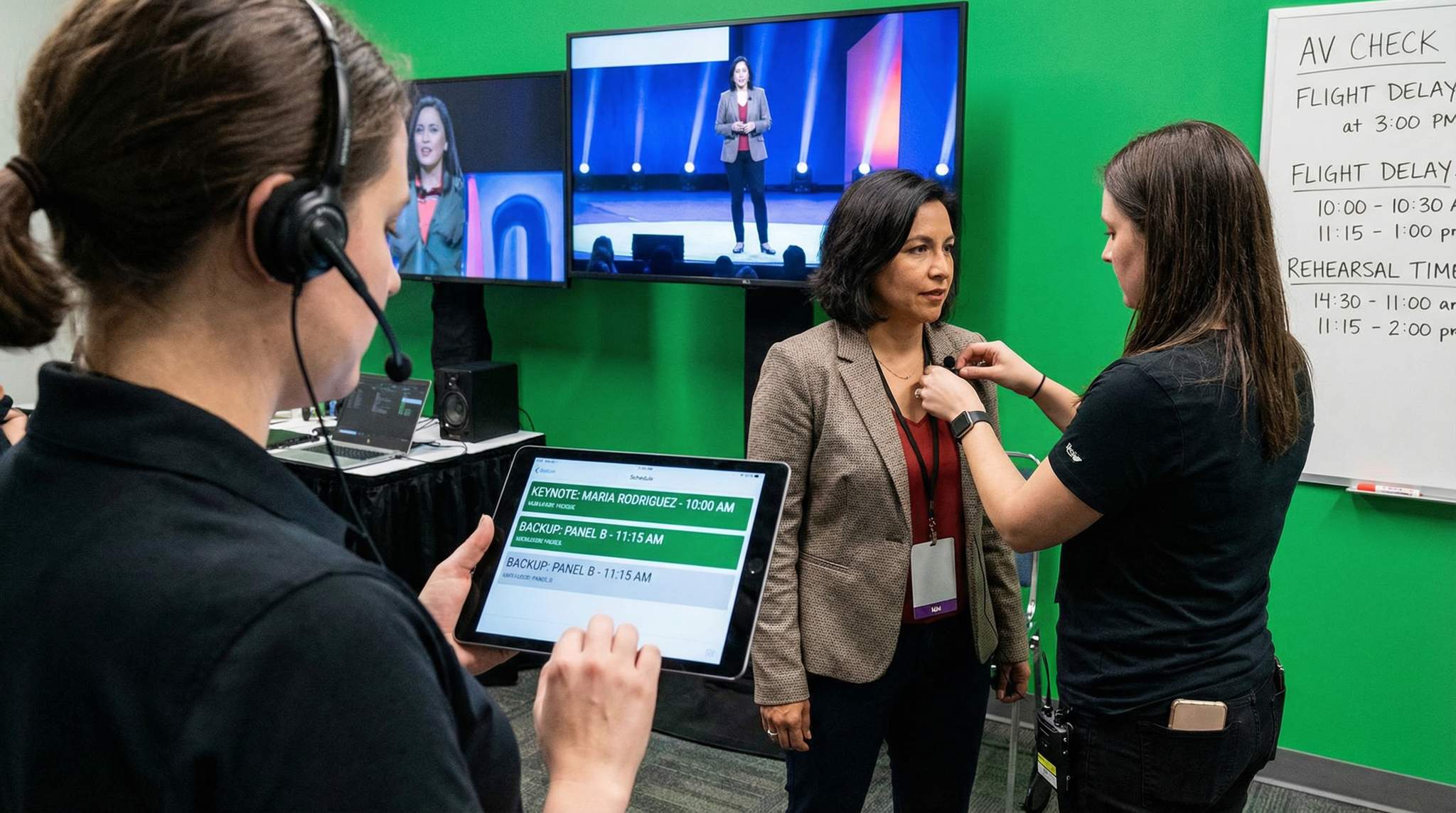
During the event, be sure to assign AV support staff or stagehands to each room (or roving among a couple of rooms) to assist speakers. These techs should arrive early to every session to mic up the speaker (clip on their lavalier microphone or hand them the handheld), test sound (“can you say a few words to test levels?”), and ensure their presentation is ready to go. They should also remind the speaker how to operate the slide advancer and what to do if something goes wrong (“if the clicker doesn’t work, I’ll advance your slides from the tech booth – just signal me”). For hybrid sessions, tech support also includes making sure remote speakers’ connections are set and that remote audience questions or feeds are managed (likely a separate person oversees that).
It’s wise to prepare backup equipment for key situations. For example, have an extra laptop on standby loaded with the presentations in case the main one fails. Keep spare batteries for microphones accessible or use fresh batteries for every important talk (never let a mic die mid-talk due to a $2 battery!). If internet connectivity is crucial for a demo, have a backup internet source (a mobile hotspot perhaps) or at least a recorded video of the demo as a plan B. Murphy’s Law often strikes live demos – savvy organizers ask speakers to bring a backup video of any live demo so it can be played if the software or connection misbehaves. Communicate this to the speaker ahead: “Your live IoT demo is awesome – could you also provide a short pre-recorded version of it, just in case Wi-Fi gives trouble? We’ll only use it as a last resort.” This kind of foresight can be a lifesaver on stage.
Lastly, make sure speakers know the tech setup before they go live. If a speaker is using their own laptop, get it connected and tested before the audience is sitting there waiting. If the conference provides the computer, confirm the speaker knows how to advance slides, play videos, or access any websites needed. Show them any confidence monitor (a screen facing them with their slides or notes), and where the countdown timer will be. Point out where the speaker timer lights are (some auditoriums have a traffic-light system: green, yellow, red for time). These details ease a speaker’s nerves. One experienced tip is to assign a volunteer or staffer as a “speaker handler” for each major speaker – essentially, someone who stays with them from green room to stage, makes sure they’re miked up, has water, and keeps track of timing. In large conventions, this role is often called a guest liaison (handler), escorting VIP speakers and ensuring they’re on schedule, which is vital for mastering celebrity guest relations. Even at smaller events, having a designated person say “Ms. Speaker, you’re up next, let’s get you set” is far better than leaving speakers to figure it out themselves.
Managing Live Streams and Hybrid Speakers
By 2026, many conferences are hybrid, with live streams or virtual components alongside in-person sessions. Integrating remote speakers and audiences adds another layer of complexity to speaker management. If you have speakers presenting via video from another location, treat their tech prep with equal importance. Conduct a virtual tech check with each remote speaker days before the event: test their camera, microphone, and internet stability. Ensure they know how to use the video platform you’ve chosen (Zoom, Teams, a webinar platform, etc.). Go over how Q&A will work – for instance, should they plan to watch audience questions coming in via an app, or will a moderator on-site field questions to them?
For hybrid sessions, you essentially have to stage-manage both the physical room and the virtual feed. It helps to have a dedicated producer for the online audience, an important role when mastering convention panel programming who can communicate with remote speakers and attendees in real time. For example, if a remote keynote is dialed in, that producer can count them in, manage any slide sharing, and handle troubleshooting, all while the on-site MC is focusing on the crowd. Make sure your remote speakers have all the same info as on-site ones – send them the run-of-show, let them virtually join the rehearsal if possible, and introduce them to their session moderator in advance.
Consider time zones for scheduling remote presenters. If you’re hosting an online panel with participants from London, New York, and Sydney, finding a slot that isn’t the middle of the night for someone is important (and if not, perhaps arrange a pre-record or ask if they’re willing). In 2026, many events choose to pre-record certain remote sessions as a backup. You might invite a remote speaker to record their talk and then have them join live for Q&A only. That way the main content plays without risk of dropout, but attendees still get real-time interaction. This can be a smart compromise for high-risk scenarios (like if a keynote’s connection is shaky or their local time is 3 AM during your conference). If you do this, be transparent with your audience that the talk is pre-recorded but the speaker is live for Q&A, so it doesn’t feel disingenuous.
Also, ensure your on-site AV setup accounts for remote speakers: projection screens to show their video in the room, good audio so the audience can hear them, and a way for the remote speaker to see the audience or at least the moderator. Some events set up a large confidence monitor that shows the remote participant the faces/front rows of the audience or the stage, so they feel more connected rather than talking into a void. Little touches like that can improve the experience for remote presenters and make their talk more engaging for everyone.
In terms of live-streaming your in-person speakers to an online audience, brief the on-site speakers if needed. Most pros won’t even notice – but it can affect things like Q&A (“repeat the question for the stream, please”) or timing (maybe there’s a hard cut-off because another live stream starts). Let speakers know if thousands more are watching via stream; it might encourage them to address the camera occasionally or be mindful of describing visuals for remote viewers. If you have any interactive elements (polls, etc.), ensure they work for both audiences or have separate ones.
Ultimately, successfully blending remote and in-person speakers is about communication and redundancy. Keep everyone in the loop, test everything twice, and have a fallback plan (e.g., a phone audio line as backup if video fails). When done right, hybrid setups can greatly expand your event’s reach – major conventions now routinely live-stream their big sessions to global audiences, as panel programming evolves beyond the main stage. With solid prep, remote speakers can be just as impactful as those on stage, and your conference benefits from being seamless across both worlds.
Speaker Communication and Content Preparation
Providing Clear Speaker Guidelines and Support
Even the most experienced speakers benefit from guidance to align with your event’s needs. Early on, provide every confirmed speaker with a Speaker Guidelines document or welcome kit. This should outline all the essentials: the expected length of their session, the format (e.g., 30-minute solo talk + 15 min Q&A, or panel discussion, etc.), the target audience profile (their level of knowledge or what they likely want to learn), and any content do’s and don’ts. For example, many conferences explicitly advise speakers to avoid heavy sales pitches or basic info if the audience is advanced. If your event has a code of conduct or content policy (say, for an academic congress, perhaps no overt political statements; or for a corporate event, keep examples confidential), gently communicate that as well.
Encourage speakers to incorporate elements that will engage your attendees. In 2026, “edutainment” is big – people love to learn while also being entertained. This aligns with the fundamental elements behind selecting captivating keynote speakers, where interactivity is key. So your guidelines might suggest including a compelling personal story, a case study, or an interactive component like a live poll or demo. If you have the tech (like an event app with polling), let them know it’s available for use. Some platforms or formats might allow live questions through an app during the session – check with each speaker if they are comfortable with that or prefer to take questions at the end. The key is to set expectations clearly: e.g., “We suggest aiming for no more than 1 slide per minute of speaking, using visuals over text, and leaving 10 minutes for audience Q&A.” You can’t script their talk, but you can steer them toward best practices that fit your audience.
If your budget and resources allow, consider offering speaker training or coaching, especially if you have many novice speakers (common in internal corporate or academic events). This could be a webinar with public speaking tips, or even a one-on-one coaching session for a key presenter who’s nervous. Some conferences provide a speaking coach who reviews slide decks and gives feedback on structure and delivery. While not every event can do this, even sharing a few online resources or articles about effective speaking can show support. Experienced conference organizers often share lessons learned (“audiences at our event respond well to XYZ, and less so to dense data tables”) with their speakers to help them succeed.
Pay special attention to any sponsored or external speakers where content quality might vary. For instance, if a sponsor gets a speaking slot, they might be inclined to do a product pitch. It’s crucial to communicate that even these sessions must deliver real value and insight, not just promotion. Often, a friendly briefing call works wonders: talk to the sponsor’s speaker about the audience’s interests and politely frame their session as “sharing expertise” rather than an advert. You can even review their slides ahead of time to ensure it’s not an infomercial. Remember, attendees will give poor feedback if any session is too salesy or off-topic, which reflects on your event as a whole.
Lastly, let speakers know about the event context and logistics that could affect how they prepare. For example, are there simultaneous talks (meaning they shouldn’t be offended if people quietly slip out mid-session to catch something else)? Is the stage huge with theatrical lighting (meaning they shouldn’t rely on seeing audience facial reactions due to lights)? Will there be interpretation or translation for international attendees (so they might need to speak a bit slower and avoid too much jargon)? These details help them tailor their delivery. A well-prepared speaker who knows the environment will feel more comfortable and thus perform better. By treating speakers as partners in putting on a great event – giving them the knowledge and resources to shine – you significantly increase the odds that every session will hit the mark.
Preparing Moderators and Panelists for Success
Panels and multi-speaker sessions require an additional layer of prep: making sure the moderator and all panelists are on the same page. A panel can easily go off the rails without coordination, so it’s your job to facilitate some structure. Start by selecting strong moderators – ideally people who are skilled at keeping time, guiding conversation, and involving all panelists. As one convention guide bluntly puts it, “A panel lives or dies by its moderator,” a sentiment echoed in guides on mastering convention panel programming. Invest time in briefing your moderators on what you expect: are they mainly to field audience questions, or do you want them to prepare a list of topics to cover? Should they introduce each panelist or will you have someone else do bios? Give them context on the audience and what tone to set (e.g., an academic panel might be very formal, while a fan convention panel is more informal and humorous).
Connect moderators with their panelists well ahead of time. As mentioned earlier, an email introduction or group call can allow them to coordinate content. Moderators should ideally circulate a few key questions or an agenda to panelists in advance. Encourage this interaction – when panelists have clear structure and topic direction, the session is far more coherent and informative for the audience, which is essential for mastering convention panel programming. It also helps avoid two panelists preparing the exact same talking point. Some moderators even gather brief input from panelists beforehand to shape the flow (“Alice will cover point A, Bob will address point B,” etc.). While spontaneous discussion is great, a loose game plan prevents chaos.
Panelists themselves should be gently reminded to be concise and audience-focused. You might send them tips like “Keep initial remarks brief so we can have more discussion,” or limit any slides (most panels discourage slide presentations from each panelist because it eats time and reduces interaction). If your panel format does involve each panelist giving a short intro or presentation, enforce time limits – e.g., “Each panelist will have 5 minutes for opening remarks, then we’ll proceed to discussion.” Let them know a moderator or room timer will keep things on schedule. This avoids the all-too-common situation of one panelist hogging 20 minutes and leaving little time for others.
Arrange a quick meetup right before the panel if possible – even 15 minutes in the green room – so everyone can say hello face-to-face (or camera-to-camera for hybrid) and confirm order of speaking, seating arrangement, etc. Check that the moderator has all panelist names and pronunciation correct for introductions. Also ensure panelists know where to sit or in what order they’ll speak. If name placards are used on stage, double-check they’re correctly placed.
Train moderators on a few key skills: managing Q&A and ending on time. Attendee questions can be unpredictable, so moderators should feel empowered to gently cut off long-winded audience members or to paraphrase and move on if needed. Provide moderators with a mic runner or volunteer for audience questions if the room is large. For time management, equip moderators with tools like countdown timers or cue cards someone can hold up (5 minutes left, 1 minute, etc.). They should also know the absolute stop time and have a strategy to wrap up: e.g., “We have time for one last question” or a concluding statement prepared.
A well-orchestrated panel is a joy for attendees – it feels conversational yet organized, and everyone gets to contribute. As the organizer, your fingerprints are subtle but important in this success. By selecting the right people and giving them the preparation and support they need, you turn potential panel chaos into an enlightening dialogue. In post-event feedback, well-run panels often score high, sometimes higher than solo talks, because attendees get diverse viewpoints and dynamic interaction. So invest the effort into moderator/panelist prep – it pays off with engaged audiences and on-stage chemistry that brings the content alive.
Ensuring Content Quality and Relevance
Content is king, and even the best speaker management logistics won’t save a conference if the talks themselves fall flat. Ensuring content quality and relevance is somewhat subjective, but there are strategies to maximize the chances that every session delivers value. Curation is the first step – during the speaker selection phase, you likely chose people based on topics they’ll cover. Continue to curate actively by aligning on session titles, descriptions, and key takeaways with your speakers. Oftentimes, an organizer will suggest a specific angle for a talk: for example, instead of a generic “Marketing 101” title, you might encourage “Marketing in the Age of AI: 5 Data-Driven Strategies for 2026.” Specific, compelling session titles set the right expectations and keep speakers focused. Work with speakers on the session description that goes in your agenda or marketing – this process can prompt them to clarify what exactly they will cover and ensure it fits your audience’s needs. If a draft description from a speaker is too vague or seems off, don’t hesitate to discuss and refine it.
Implement a content review process if feasible. This could be as light-touch as asking for an outline of the talk or a few bullet points of the main message ahead of time. Some conferences (especially academic ones) have committees that review full presentation materials or papers. In professional conferences, it might be a program director or content team member who reviews slides submitted by certain speakers to verify they meet quality standards. While you can’t (and shouldn’t) micromanage every word a speaker says, you can certainly flag if, say, half the slides are a product advertisement, or if the content seems too elementary for an expert audience. When giving feedback, frame it positively: “Our attendees are already familiar with the basics you cover in the first 5 slides; perhaps we can trim that and spend more time on the advanced portion you get to later. They’d love deeper insights.” Most speakers will appreciate guidance that helps them better connect with your audience.
Encourage speakers to include real-world examples, case studies, or data to support their points. Attendees tend to rate sessions higher when they walk away with concrete learnings or evidence-based insights. If you have industry reports or research (like a relevant survey or trend report), share it with speakers who might incorporate or reference it. This not only improves content but also sometimes provides an external validation (“According to PCMA’s latest meetings survey, 67% of planners prioritize audience engagement when choosing speakers – reinforcing why we did X”). For instance, letting a speaker know about fresh industry data means they can weave it in and appear extremely up-to-date, which reflects well on your conference’s timeliness.
Another aspect of quality is appropriateness. Make sure speakers know the ground rules for content: e.g., if there are any forbidden topics (maybe at a government conference, overt political endorsements are off-limits; or at a youth-oriented event, profanity and adult content are no-go). Most events also require that speakers avoid discriminatory or harassing content – this should be covered under your event code of conduct which you’ve shared. It’s rare but there have been cases of speakers making offensive jokes or comments that upset audiences and derail events. A simple mention in the guidelines (“Please ensure content is appropriate for a professional audience and free of any derogatory language or imagery”) covers your bases. If your event is providing continuing education credits (like CME for medical or CLE for legal), be sure speakers understand any requirements like including learning objectives or avoiding commercial bias. Those industries often have stringent content rules.
Finally, aim for cohesion and flow in your overall program. While each speaker works on their individual content, you as the organizer can design the show so that sessions build on each other or at least don’t massively overlap or contradict. You might cluster sessions by theme on different tracks or days. If two keynotes unknowingly plan to cover very similar ground, optionally let them know (“FYI, the opening keynote will touch on that topic as well, perhaps you can focus more on X to complement it?”). During your opening remarks or in the program, you can draw connections: “This morning’s talk on cybersecurity will set the stage for the panel this afternoon where we’ll delve into data privacy.” This helps attendees see the conference as a curated journey rather than random talks thrown together.
In summary, treat content curation as an ongoing process, not a one-time choice of speakers. By collaborating with your speakers on refining titles, reviewing key points, and adhering to quality standards, you raise the bar for everyone. When attendees consistently find that each session gives them something new, relevant, and well-presented, your conference earns a reputation for high-quality content – and that starts with the behind-the-scenes content management you do with speakers well before they step on stage.
Onsite Speaker Management: Execution and Stagecraft
Streamlined Speaker Check-In and Green Room Hospitality
When conference time finally arrives, one of your first tasks each day is welcoming speakers on-site and getting them oriented. Don’t make speakers stand in the same long registration queue as attendees. Instead, provide a dedicated speaker/VIP check-in desk or a clearly identified person to greet them. Many conferences have a sign or even staff holding a tablet with the day’s speaker list to quickly check off when someone arrives. The process should be quick: give them their badge (pre-printed with any special ribbon like “Speaker” or “VIP”), provide any speaker gift or info packet, and then escort them where they need to go. This not only makes them feel valued, it also ensures they don’t get lost in the crowd or wander off right before their session because they were unsure where to go.
To avoid any chaos in the main lobby, consider telling speakers to check in at the Speaker Ready Room or Lounge instead of the general registration area. In the speaker communications, specify: “Please come directly to the Speaker Ops Room in Ballroom C upon arrival.” There, your team can handle their check-in privately and perhaps do those last-minute slide uploads or mic checks. This separation can be logistically smoother, especially if you have many attendees arriving at once. A well-organized event uses technology to expedite check-in too – for example, RFID badges or QR code check-ins can speed up the process, effectively streamlining convention badge registration in 2026. If your event app or ticketing system (like Ticket Fairy) supports a speedy check-in, definitely use it for speakers to minimize any waiting around. The goal: in less than a minute of arrival, a speaker should have their credentials and be headed to the green room or their session room.
Speaking of green rooms: provide one if at all possible, especially for larger events. A speaker green room is a private backstage or off-stage area where speakers can relax, prepare, and mingle with other speakers. Stock it with refreshments (water, coffee/tea, light snacks – nothing that could stain outfits or cause a mess) and some comfortable seating. Having a green room not only treats speakers like VIPs, it keeps them accessible to you. If you need to find a speaker for a last-minute change, chances are they’ll be in the green room rather than who-knows-where in the venue. Staff the green room with a coordinator or volunteer who can assist speakers – whether it’s answering questions, helping retrieve something from their car, or ensuring they go to mic-up on time.
For high-profile keynotes or those who request privacy, you may have a VIP lounge or private prep room separate from the main speaker lounge. Some celebs or dignitaries prefer a quiet room to themselves (or with their team) before going on stage. Accommodate this if you can – it can be as simple as partitioning a section of the green room or using a nearby meeting room. Ensure security or staff know to restrict access to only authorized people for those VIP areas. If your keynote is super-famous, you might also coordinate discrete entry/exit to avoid them being mobbed by fans en route.
A nice touch: have a host or volunteer in the green room to introduce speakers to one another and break the ice. Speakers often enjoy meeting their peers at the event. A quick “Dr. Lee, meet Professor Gupta – you’re both speaking on AI today!” can lead to great networking for them and even cross-references on stage (“As Dr. Lee said in her talk this morning…”). Happy, comfortable speakers are more likely to deliver great talks, so invest in their on-site experience. Water, Wi-Fi, and a calm environment go a long way. Also make sure the green room has a real-time event schedule display or runner keeping speakers aware of timing – e.g., “You’re on in 20 minutes, I’ll take you to the room in 10.” They shouldn’t have to watch the clock; you do that for them.
Emcees, Session Hosts, and Stage Flow
A strong Master of Ceremonies (MC) or session host is like the glue that holds your conference schedule together on stage. The MC’s role is to energize the crowd, introduce speakers, handle housekeeping announcements, and bridge any gaps if something goes wrong. Choose your MC carefully – it could be a professional host, a charismatic industry figure, or even yourself if you’re comfortable. Make sure the MC is well-prepared with pronunciations of names, speaker bios (keep intros brief!), and an understanding of the event themes. Provide them a script or cue sheet for each introduction. Nothing is worse than a bungled intro after all the work a speaker put in; a good intro hypes up the audience and gives the speaker a confident start.
For multi-track events, you might not have one single MC but instead have session chairs or room moderators who act as hosts in each room. Train these folks on basic stage protocol: checking microphones, welcoming the audience, introducing each speaker/panel, keeping sessions on time, and thanking the speakers at the end. It helps if they have a signage or a way to signal the speaker about time (like those countdown cards). Instruct them on what to do if a speaker finishes super early or runs late. For instance, if early, they might facilitate extra Q&A or a brief networking break until the next scheduled session; if late, they must politely cut things off to stay on schedule. As the organizer, give them the authority to do so – they can say “I’m sorry, we have to wrap up to stay on schedule” and lead applause to end gracefully. Empowering your room hosts to manage time ensures the whole conference runs smoothly and sessions don’t spill over into each other. This discipline is crucial for mastering convention panel programming and ensuring attendees acknowledge and follow schedules.
It’s wise to have a short meeting or call with all MCs/hosts before the event (maybe morning of each day) to review any schedule changes, VIP acknowledgments, or announcements. Keep them updated in real time if something changes. For example, if a speaker is running late and you need the MC to stretch on stage (“Folks, we have a 5-minute coffee top-up break while we set up the next speaker”), coordinate that through a stage manager or headset.
During the event, maintain close communication between the backstage/tech crew and the stage host. If your MC is ad-libbing while a laptop is being swapped, a tech should cue them when all set (“thumbs up, you can introduce now”). For big keynote sessions, a rehearsal with MC, speaker, and AV is ideal so everyone knows the choreography: how the speaker will come up, if there’s walk-on music, etc. It can be as detailed as which side of the stage the MC should exit so they don’t collide with the speaker entering.
Quick tip: Always have a backup plan for the MC. If your singular MC loses their voice or is stuck in traffic, have someone who can step in, even if it’s a last-minute decision. Also, if your MC has to be away (nature calls or urgent issue) during a session, designate who covers.
A skilled MC or session host does more than just introductions – they keep the energy and pacing on point and make the whole event feel professional and cohesive. They can also cover moments of surprise, like technical delays or an absent speaker, with poise. For instance, an experienced host might engage the audience with a quick anecdote or interactive question if they sense something needs a minute to fix. This ensures attendees never feel a dull moment, even if behind the scenes you’re scrambling. In essence, your MCs and hosts are the face of your event’s organization; investing in good ones elevates the perceived quality of your conference tremendously.
Managing Audience Q&A Sessions
Audience interaction can turn a one-directional lecture into a dynamic dialogue. But it needs to be managed deftly to be effective. Question-and-answer sessions (Q&A) are the most common format. To make Q&A work well, plan for it: decide if you’ll take questions only at the end or also throughout the talk. Communicate that plan to the speaker and moderator. Many speakers prefer holding questions until the end to preserve flow, but some like taking questions on the fly. At large conferences, usually Q&A is at the end and relatively brief.
Logistically, how will audience members ask questions? In smaller rooms, they can simply raise hands and speak. In larger halls, you’ll need microphone runners or stand mics. Prep a couple of volunteers or staff to act as mic runners – they should move quickly to whoever raises a hand. It’s helpful to have one on each aisle. Train them to hold the mic for the attendee (especially if you want to avoid someone hogging it) and to politely retrieve it after the question. Alternatively, place fixed mics in aisles or the front and ask people to line up – though that can take time.
Modern events often supplement or replace live Q&A with tech-based solutions. For example, using an event app or a tool like Slido where attendees can submit questions from their phones. This has big advantages: questions can be crowdsourced and upvoted, so the most popular ones rise to top, and it avoids the scenario of one person monopolizing the mic. If you use such a tool, have the moderator or a dedicated facilitator curate the questions – they can combine similar ones, skip inappropriate ones, and make sure a variety of topics get addressed, a technique often cited in mastering convention panel programming. Make sure to display the questions to the speaker or have them read out by the moderator. Tech Q&A works especially well for hybrid audiences (so remote viewers can participate equally) and for shy audiences who might not stand up at a mic but will type a question. Just ensure there’s a moderation layer – don’t stream unfiltered audience text questions onto a big screen without review, to avoid any off-topic or offensive content sneaking through, ensuring the audience hears what they most want to hear.
Advise your speakers and moderators on a few Q&A best practices: repeat or paraphrase each question before answering (this ensures everyone in the room and on the stream hears it, and gives you a moment to think). Keep answers concise so more people can ask questions. If someone asks a completely tangential or overly specific question, the speaker or moderator can acknowledge it but perhaps suggest taking it offline after the session to keep the main Q&A on track. It’s also wise to prepare a question or two in advance (often called a “seed question” or backup question). This can be supplied to the moderator or the speaker themselves can have one. It avoids the awkward silence if no one in the audience immediately jumps in. The moderator can break the ice: “While you think of questions, I’ll start with one: earlier you mentioned XYZ, could you elaborate…?” Once one question gets asked, usually others will follow as the crowd warms up.
Sometimes, despite encouragement, audiences are quiet. In such cases, the moderator might engage in a short dialogue with the speaker or wrap up early – and that’s okay. It’s better to end a bit early than to force a Q&A that isn’t happening. Conversely, if hands are still up when time is over, the moderator should politely close: “I’m afraid we’re out of time, but please feel free to approach our speaker during the break with your questions.” If a session finishes early and you have slack in schedule, you can extend Q&A or transition into a quick networking exercise (“turn to your neighbor and share one takeaway from the talk!”) or just give everyone an extra break. But coordinate that with scheduling (don’t start the next talk early if people are expecting it at a set time – latecomers might miss it).
Always have a plan for the last 5-10 minutes of a session. That is usually Q&A time. Ensure the moderator or host is keeping track and gives a warning: “Last question now” or “Two minutes left.” It’s better that the session host, not the speaker, be the timekeeper in Q&A so the speaker can focus on answering. If an audience member’s question is dragging on (some people start making speeches), the moderator can intervene: “Excuse me, to be fair to others, can you please frame your question?” or even gently cut them off and move on. It sounds tough, but a good moderator balances being courteous with keeping the Q&A useful for everyone.
In summary, a lively Q&A can significantly boost engagement and allow deeper exploration of the topic – but it needs structure. By equipping your rooms with the right tools (mics, apps), empowering moderators to curate and control, and prepping speakers to handle questions, you’ll turn potentially chaotic moments into some of the most insightful parts of the conference. Many attendees judge a session’s value not just by the presentation but by the quality of discussion in Q&A, so manage it well to leave a strong final impression.
Keeping the Show on Schedule (And Adapting if Not)
In live events, timing is everything. Attendees often plan their day around catching specific talks, moving between tracks, networking in breaks, etc. If one session runs 20 minutes over, it can throw off the rest of the schedule and frustrate those coming in for the next slot. Thus, a core job of speaker management on-site is to ensure sessions start and end on time as much as humanly possible.
Reiterate the importance of timing to all speakers and moderators. In your pre-event communications, it should be crystal clear: “You have a 45-minute session including Q&A. It is crucial to stay within this timeframe.” On site, use visible and audible signals. For larger stages, having a big countdown clock facing the speaker (on a confidence monitor or separate display) is ideal – speakers can self-regulate when they see time ticking down. Alternatively, the old-school method works: cue cards or light signals. Your staff can hold up signs that say “5 MINUTES” and “TIME” at the appropriate moments. Some events use a coloured light system in front of the stage: green (keep going), yellow (wrap up soon), red (time’s up). However, not all speakers notice these while in the flow, so sometimes a moderator needs to gently step in. For example, standing up and moving toward the stage, or taking the mic to thank the speaker, which is the polite signal to wrap.
Despite these measures, be prepared for those who might go over. If a speaker is a minute or two over but concluding, it’s often better to let them finish their final sentence gracefully than to abruptly cut them off in front of the audience. But if someone is obliviously running 5+ minutes over and threatens to derail the next slot, a moderator or MC must intervene. One tactic: begin clapping (the audience usually joins) to signal the end, or walk on stage thanking them – basically forcing a conclusion. It’s uncomfortable but necessary on occasion. Brief your moderators that they have the authority to do this if needed for the greater good of the schedule. Cutting someone off may be necessary if they started 20 minutes late, and robust panel operations require plans for delays. Also, ensure the next speaker isn’t shy about nudging in if the room is meant to be theirs at a certain time – you might have a room manager say, “We need to set up for the next session now.”
Another timing aspect is transitions and breaks. Protect the break times because attendees (and speakers) need them. If one session goes long, don’t steal time from lunch or coffee breaks without announcing it, or you’ll have grumpy, hungry participants. Instead, adjust by slightly shortening the next session (with that speaker’s agreement if possible) or overlapping non-critical elements. For instance, if morning keynotes ran 10 minutes late, you might shave 5 minutes off the break and 5 off the next panel, but communicate it clearly on signage or announcement: “We’re running 10 minutes behind schedule; the next sessions will start at 11:10 instead of 11:00.” Attendees can be flexible if kept informed, but they hate being left in the dark about timing.
A great practice is having a real-time communication channel among the organizing team to flag any schedule slips. For example, if Track A is 15 minutes behind but Track B is on time, someone might coordinate holding Track B’s start slightly so attendees switching tracks aren’t lost. Alternatively, if tracks operate independently, that’s fine – but then maybe make an announcement in Track B that Track A is behind if it affects a combined audience later.
If a speaker finishes early (yep, it happens too!), you have a pocket of time. You can either let everyone go early – turning it into bonus networking or break time – or fill it with something useful. Some events prepare a few “micro sessions” or extra content just in case, but that’s rare. Usually, ending early is a minor issue as long as the next scheduled item doesn’t start until its published time. Just ensure another speaker doesn’t jump up 15 minutes early, as attendees might still be trickling in expecting the later start. Use that gap for extra Q&A, or encourage attendees to stretch and visit a sponsor booth, etc. Again, communication is key: “We have ended a bit early, we will resume at the scheduled 3:00 PM time with the next speaker.”
Ultimately, no one notices when a conference is precisely on time, but they sure notice when it’s running late. Stay vigilant, use your tools and people to keep things moving, and be ready to flex where needed. Managing the clock is an underappreciated art of event execution – do it well and your attendees will subconsciously appreciate how smooth everything felt. And your speakers will benefit too: a well-timed event means full rooms and attentive audiences for them at every session, not crowds that are thrown off by delays. It’s all interconnected, and as the organizer you’re the conductor keeping the trains running on schedule.
Contingency Plans for Speaker Issues
Backup Speakers and Filler Content Options
No matter how much planning you do, sometimes the unexpected will happen – a speaker falls ill, a flight gets canceled, or a personal emergency arises on the day of their talk. To avoid panic in these situations, wise organizers prepare backup plans in advance for key sessions. The simplest contingency is having a list of one or two potential backup speakers who could step in if needed, which is one of the 4 ways to handle event speaker no-shows. These could be speakers from elsewhere in your conference who have relevant expertise and a flexible schedule, or local experts you know you could call on short notice. For instance, if your headline keynote cancels morning-of, perhaps one of your other session speakers could expand their talk to fill that slot, or a moderator could elevate a panel of experts to main stage.
Establishing relationships with a pool of reliable speakers “on standby” can be a lifesaver. In practice, you might not tell them explicitly they are backups (to avoid them feeling second-tier), but you keep them in mind and maybe even prep them informally (“If ever we needed someone to give an extra talk, would you be open to it?”). Some organizers network with local industry associations or universities to have an academic or industry veteran who can deliver a solid general talk if needed. When planning your event, create a list of past speakers or colleagues who you know are skilled and usually nearby – these are your emergency pinch-hitters, a strategy recommended when considering ways to handle event speaker no-shows. Keep their contact info handy on event day.
If a speaker cancellation happens with a bit of lead time (say a week or two out), you can often find a replacement by reaching out through your network, speaker bureaus, or even asking a sponsor if they have an expert who can fill in (careful that they maintain quality). Sometimes attendees themselves can become the content – maybe that empty slot turns into a roundtable discussion or a facilitated brainstorming among those in the room. One very resourceful tactic if an important speaker cancels last-minute: promote another scheduled session into that slot. For example, if your closing keynote fell through, you might ask the opening keynote (if they’re still around) to do an encore Q&A or deeper dive session in that closing slot. Or you could move a popular breakout session into the keynote hall to serve as the closing plenary. It requires quick reprogramming, but attendees often understand and appreciate that you still provided value.
Beyond backup speakers, have some “filler” content options up your sleeve. These are alternate activities or discussions that can engage the audience if needed. Ideas include:
– Expert Panel or AMA (Ask Me Anything): If one speaker is out, perhaps bring two or three other speakers on stage for an impromptu panel taking questions on a broad topic. Chances are, among your attendees or other speakers, there’s plenty of knowledge to tap. This effectively crowdsources the session, effectively utilizing ways to handle event speaker no-shows.
– Interactive session or networking exercise: Turn the lost session into a structured networking opportunity. For example, have people break into small groups to discuss a topic or do a “speed networking” round. It might not be what was planned, but attendees will often enjoy the chance to connect with each other, turning a cancellation into an opportunity as suggested in guides on handling speaker no-shows.
– Extended Break/Expo Visit: If content truly can’t be filled, convert the time into a longer coffee break, exhibitor visit, or a bonus coffee/snack service. Just frame it positively: “We’ll use this time to network and explore the expo. Please visit our sponsors or take a refreshment break.” As one planner quips, a “Networking Bonanza” can salvage a canceled session by giving attendees what they always say they want more of, proving that handling event speaker no-shows can sometimes lead to positive outcomes.
– Virtual Speaker or Video: In some cases, you might quickly arrange for the missing speaker to join remotely via video conference if they’re able. If not live, maybe they can send a pre-recorded message or you have a relevant TED-talk or company video that could play (clear rights for public viewing, though!). Not ideal, but better than nothing if people assembled expecting content.
The key to all these backup plans is speed and communication. As soon as you know a speaker isn’t showing, rally your team to implement Plan B. If that means tapping a backup speaker, someone should be on the phone to them immediately and getting their materials. Simultaneously, inform your AV crew and MC about the change so they’re not announcing a speaker who isn’t there. Then tell the audience promptly – transparency goes a long way. It’s far better that attendees find out early and through official channels than through rumors or an empty stage. This is a core tenet of convention crisis management and emergency planning. For example, “Unfortunately, Speaker X couldn’t be here due to travel issues. But the good news: we have an exciting interactive session instead / Speaker Y has graciously agreed to step in with a related talk,” etc. Attendees appreciate honesty and a solution, rather than sitting confused or hearing whispers.
By having backup content ready, you demonstrate professionalism and resilience. Many veteran organizers swap war stories of last-minute speaker swaps that attendees barely noticed because the team handled it so smoothly. Aim for that level of preparedness. It’s not that you want to ever use these backups, but like event insurance, you’ll be relieved to have them if needed. And even if you don’t, the exercise of planning them often uncovers creative ideas to enrich your event anyway!
Handling Last-Minute Speaker Cancellations or No-Shows
Despite all your planning, you might one day face the nightmare scenario: a speaker who is supposed to be on stage in an hour is nowhere to be found (or calls you with “I’m stuck at the airport” or “I woke up sick”). In these critical moments, stay calm, gather facts, and act swiftly. First, determine if there’s any way the speaker can still participate. Could they present remotely via video-link if they can’t be there in person? Could you shift their session to later in the day (if they’re just delayed a few hours) and swap in another session now? Sometimes a creative shuffle can save the day.
If the speaker is a definite no-go, immediately loop in your team and execute the contingency plan. Notify key stakeholders internally: the stage manager, MC, tech lead, etc., so no one is caught off guard. Then craft a message for attendees. Honesty and proactiveness are crucial – it’s far better that attendees find out early and through official channels than through rumors or an empty stage. For example, if a keynote cancels the morning of, send a push notification through your event app or an email first thing: “We regret to announce that [Speaker Name] will be unable to attend due to [reason]. But don’t worry – we have an exciting alternate session planned…” and provide details of the change. When a cancellation happens, crafting the right message is essential. Attendees will be disappointed, sure, but they will appreciate transparency and knowing what’s happening instead. Many events have gotten praise for how they handled cancellations by being upfront and even a bit personal in the messaging (“We know many of you were looking forward to her talk; we’re disappointed too! Let’s all wish her a speedy recovery.”). This human touch can turn potential anger into empathy, avoiding the pitfalls of poorly handled celebrity cancellations.
Now, figure out the replacement content (as covered in the backup section above) and execute it. If it’s bringing in a backup speaker, quickly prep them – they might need to grab their slides or you might just do an armchair Q&A with them if they don’t have a presentation ready. Simplify wherever possible: now is not the time for complex formats. For instance, one convention faced multiple celebrity guest cancellations due to a sudden travel shutdown; the organizers immediately announced it on social media and onsite, and they reorganized the schedule, combining a couple of smaller panels to fill the big slot. This illustrates convention crisis management in action, where guest cancellation is one thing, but keeping content flowing is another. Attendees were sad those guests couldn’t come, but appreciated that the show largely went on and that the organizers were honest and apologetic rather than defensive, learning from past celebrity cancellation incidents.
Keep an eye on attendee sentiment during this pivot. If it’s a fan-type event and you canceled a beloved speaker, expect some disappointment or even anger. Address it: perhaps offer something to make up for it (like a voucher for a free drink, or an extra giveaway, or for multi-day events, maybe a small discount on next year if the cancellation was a huge blow). In professional conferences, usually an apology and solid replacement content suffice. If the missing speaker was a big draw, consider if you can arrange a follow-up webinar after the event with that speaker – essentially delivering their promised talk virtually at a later date for attendees. This can turn a negative into good will, showing you’re committed to delivering the value people expected, albeit on a delay.
Internally, make sure your staff knows what to communicate. The registration desk or info table might get queries (“Has Dr. X arrived yet?”) – ensure they have the official response ready. And if media or press are present, be prepared with a statement if it’s notable (especially if the speaker was high-profile). Stick to the facts and highlight what’s still great about the event.
One more angle: if a speaker simply no-shows without any notice (rare, but it happens), treat it similarly – announce the change, fill the slot, and after the dust settles you can reach out to find out what happened. Sometimes miscommunications or personal emergencies are at play. If a speaker just forgot or blew it off (again, very rare in professional spheres), you likely won’t invite them again. The show must go on, and your job is to ensure attendees still get a full experience even when a piece is missing. Your crisis handling will be remembered almost more than the cancellation itself – many conventions have had big guests cancel, but fans later praise how well the organizers managed it, proving the value of convention crisis management and emergency planning. Be that organizer who turns a potential disaster into just a slight detour in the program.
Mitigating Technical Failures During Presentations
Murphy’s Law loves live presentations – if something can go wrong, sooner or later it will. The mic might cut out mid-speech, the slide clicker might die, the video in the presentation might not play, or the lights might even go off (like the infamous CES blackout one year). Having a solid AV team is your first line of defense; they should be monitoring and ready to jump on any issue. But there are steps you as the organizer can take to mitigate tech problems and handle them smoothly when they occur.
Firstly, redundancy is key. As part of prep, we discussed having backup equipment (extra mics, spare projector bulbs, backup laptops). Ensure those backups are in place and easy to access quickly. For instance, if a presenter’s laptop on stage freezes, the AV tech should be able to switch to the backup machine with the presentations loaded within seconds. Practice this scenario with the crew. Similarly, for audio – keep one mic channel open as a backup. If the lav mic fails and starts crackling, a tech or stagehand can promptly walk on with a handheld mic for the speaker. Coach the speaker beforehand that if someone hands them a handheld mic suddenly, it means something went wrong with their lav and they should just take it and continue.
Voltage regulators and battery checks: make sure all wireless mic batteries are fresh for each session. It’s a small cost that prevents a big embarrassment. Use power conditioners on your AV gear to avoid power spikes. In case of a bigger power failure (like a projectors lose power or lights flicker), have emergency lighting and an AV restart plan. In a large hall, even a brief loss of projectors can cause a stir – your MC can fill by calmly talking to the audience if needed (“Looks like our projectors are waking up – bear with us, folks!”). A calm, even humorous acknowledgment by the host or speaker can defuse tension.
Train your speakers on how to handle minor tech hiccups. For example, if a slide doesn’t advance, don’t have them repeatedly click in a panic; instead, they can continue talking and subtly signal to the tech booth to advance it for them. If a live demo fails, they should be prepared to describe what would have happened or pivot to an alternate example. The audience is usually sympathetic if the speaker doesn’t panic. In fact, some mishaps can become memorable moments if handled with grace or humor. Encourage speakers to keep a level head and maybe have a one-liner ready (“Ah, the demo gremlins are at it again!”) and then move on, rather than freezing.
From the organizer side, if something irreversible happens – say the presentation file is corrupted and won’t open – have a plan B content for that session. Could the speaker just do a talk without slides? Or perhaps sit for a Q&A with the moderator instead? It’s better than cancelling outright. There have been events where a speaker’s slides failed completely, but they did an engaging talk and chat with the audience and it turned out fine (sometimes even better!). This circles back to having quality speakers who know their material beyond the slides.
Ensure there’s a clear line of communication between the AV booth and stage personnel. A stage manager with a headset can relay info quickly – e.g., if the booth is fixing an issue, they can tell the MC “stretch for 2 more minutes.” Likewise, if something can’t be fixed quickly, the stage manager can decide to transition to plan B or a break. Don’t leave everyone awkwardly waiting in silence while a tech troublehoots for 10 minutes – make a call to pivot and come back to it later or offer an alternate activity. You might say, “We’re experiencing technical difficulties and will resume this session shortly. In the meantime, please enjoy a quick stretch break,” and play some background music. Keep attendees informed at least every few minutes on status (“Thank you for your patience, we’re almost set!”), as advised in guides on what to do if your tech fails.
A special note on virtual/hybrid tech issues: if a remote speaker’s connection drops, have the moderator or MC step in immediately to fill. Perhaps do a quick ad-hoc Q&A with the audience about the topic until the speaker reconnects. If it’s not coming back, again, communicate: “We’re sorry, we lost our connection with London. We’ll try to bring Dr. Smith back on shortly. In the meantime, we’ll move forward with our next session and hope to have her join at the end for Q&A.” Shuffle things if needed.
Document every tech failure post-mortem so you can improve. If the Wi-Fi crashed because too many attendees hopped on, you’ll know to upgrade bandwidth next time. If a particular room’s projector overheated daily at 4pm, maybe the AC needs cranking or the projector replaced. Constant improvement will reduce these incidents.
Ultimately, the audience will forgive technical issues if you handle them professionally and keep people informed, so lean on your team to resolve issues quickly. They happen to everyone. The goal is to avoid them where possible, and when they do occur, have a practiced response so that the impact on the event experience is minimal. A well-managed hiccup can even be a bonding experience (“remember when the lights went out and we all held up our phone lights and the speaker kept going!”). So prepare, stay cool, and carry on – the show, as always, must go on.
Dealing with Difficult Situations On Stage
While rare in professional settings, occasionally a speaker session can take an unexpected turn because of human factors – perhaps a speaker makes an inappropriate remark, an attendee heckles or asks a very hostile question, or a debate among panelists gets heated beyond the norm. Having a plan for on-stage crises or conflicts is part of comprehensive speaker management. You hope these never happen, but being ready can protect your event’s reputation and ensure attendee safety and comfort.
First, set expectations and ground rules to prevent issues. In your speaker agreements or briefings, include any relevant code of conduct items. For example, if certain topics (like overt political stumping, hate speech, or harassment) are off-limits, state that clearly. Most professional speakers wouldn’t cross those lines, but at large conventions or multi-genre events, you might have more unpredictable personalities. Also, prepare moderators to handle sensitive content: e.g., if an audience question is clearly off-topic or designed to provoke, the moderator can dismiss it and move on.
If a speaker says something truly offensive or out of line, your MC or a senior organizer might need to step in. This is delicate – you don’t want to start a bigger scene, but you also have a duty to your audience. Depending on severity, you might let it pass and address it later (if it was a minor insensitive joke that landed badly), or you might intervene on the spot (if something blatantly violates policy or law). Intervening could mean walking on stage and calmly saying, “Thank you, let’s move to our next session,” essentially cutting it short. Or in a panel, a skilled moderator might counter the comment diplomatically or steer away. Always prioritize the safety and inclusion of attendees. If something is making your audience feel unsafe (e.g., a speaker is verbally attacking an audience member or group), action is warranted.
Hecklers or disruptive attendees during Q&A are another scenario. Train moderators and even security for this. If someone is repeatedly interrupting or shouting, the moderator should politely ask them to reserve their comments or the session will continue without them. If it escalates, your security team may need to escort the individual out. Have security briefed on how to identify when it’s time to step in – usually a last resort. There have been cases at conferences (especially high-security events) where protestors might hijack the mic to shout a message. If you suspect a controversial topic, maybe pre-screen questions through written notes or an app to avoid giving a live mic to someone you haven’t vetted. It’s not about censorship; it’s about maintaining order so the event can proceed for everyone’s benefit.
Panelist disagreements are usually fine – a bit of lively debate can be engaging. But if panelists get truly confrontational or go off the rails (maybe personal attacks, or one refuses to let others speak), the moderator must assert control. Brief moderators that they can intervene if needed, even if it means tactfully saying, “Let’s refocus on the topic,” or physically giving the floor to another panelist who’s been cut off. In extreme cases, taking a pause – “I think we should take a short break here” – can diffuse tempers. Usually, though, professional panelists keep it civil. Where this sometimes arises is in fan conventions or community events where panelists might be less experienced. Thus, your moderator choice there is critical.
Have a PR response plan in case something really goes wrong publicly (e.g., a speaker’s remark causes social media uproar or press interest). Your event PR or communication team should be ready to issue a statement or apology if needed, and clarify that the views of speakers are theirs only (common disclaimer). This falls more under crisis comms, but intersects with speaker issues. An example might be if a keynote said something factually wrong and damaging – you might later correct the record officially.
Finally, ensure support for anyone affected. If an attendee was harassed or a group felt targeted by a comment, reach out to them, acknowledge it, and affirm your event’s values. Sometimes your swift, caring response can turn a negative incident into a moment that reinforces your commitment to a safe, inclusive environment.
It’s unlikely you’ll need to deploy these measures, but having them in your back pocket means you can act decisively if the situation arises. Empower your staff and moderators to uphold the event standards on stage. Much like a fire drill, you hope to never have to stop a session due to behavior issues, but knowing how to do so could prevent a bad situation from becoming a full-blown crisis.
Maximizing Value and Post-Event Follow-Up
Measuring Speaker Impact and Session Feedback
After the lights dim and the crowds go home, it’s time to evaluate: How did our speakers perform, and what was the impact on our attendees? Gathering and analyzing feedback is crucial for proving ROI (to your bosses, sponsors, and the event itself) and for making next year’s conference even better. Start by deciding what success looks like for speaker sessions. Common metrics include: attendee satisfaction scores, attendance numbers per session, engagement levels (questions asked, polling participation), social media mentions, and anecdotal feedback.
One of the most straightforward tools is a post-event survey or even session-by-session evaluations. Using your event app or online forms, ask attendees to rate each session they attended on a scale and provide comments. To encourage responses, send the survey promptly (same day or next day when the experience is fresh) and keep it short. Questions might cover: quality of content, effectiveness of speaker, relevance, and key takeaways learned. If your platform allows, you can push a quick poll immediately at session end to those in the room (“Rate this session 1-5”). Response rates vary, but even a sample gives you insight. Look for patterns: if one speaker consistently gets 4.8/5 and glowing comments like “Best talk of the event,” that’s a person to invite back or put on the keynote stage next time. Conversely, if a session shows 2.5/5 with comments “too salesy” or “disorganized,” you know that content or presenter might need rethinking.
Another angle: attendance data. Use your registration system or door counts to see how many people attended each talk versus how many were expected (if you required session sign-ups). Large drop-offs or half-empty rooms could indicate lesser interest in that topic or conflicting scheduling. If possible, track if people left mid-session – some events do this via RFID badges or mobile app check-ins, but those are advanced metrics. At least noting eyeball counts and comparing to room capacity can reveal popularity. If one breakout was overflowing with standing room only, that subject might merit a bigger room or more sessions next time.
For marquee speakers, monitor social media and press. Did the keynote spark a lot of tweets or LinkedIn posts quoting them? Tools or manual hashtag searches can gauge sentiment. If attendees are sharing quotes or praising a talk online, that’s a win – qualitative but powerful. Some conferences even analyze which speakers drove the most social media engagement or press mentions (e.g., “Our CEO’s keynote was covered in 5 media outlets, reaching an audience of X.”). These are great to report to stakeholders to show the event’s impact beyond the ballroom.
Consider doing an internal debrief focusing on speakers. Gather your organizing team (and volunteers who were session room hosts) and discuss: Which speakers were a joy to work with? Who caused headaches? Were there any complaints (or compliments) from attendees that stood out? Document this. It’s common to build an internal “database” of speaker profiles with notes – e.g., Jane Doe: excellent content, drew 300 attendees, a bit slow to get slides in but very popular. or John Smith: lots of last-minute requests, average evals. This helps future planning – maybe you’ll still book John but give extra support, or choose someone else with fewer hassles if content was mediocre.
Don’t forget to measure sponsor and stakeholder satisfaction if relevant. If sponsors provided speakers (like a gold sponsor got a speaking slot), check with them afterward – did their speaker feel it went well? Did they get good engagement (e.g., increased booth traffic after the talk)? This is part of sponsor ROI and can justify their investment when renewing for next year. Also, your own higher-ups might ask: how did our opening company keynote land? Having tangible data (“90% of attendees rated it good or excellent, and media coverage reached an estimated audience of 2 million”) is powerful, moving the needle on registrations, as survey results explore speaker-planner dynamics.
In summary, collect both quantitative scores and qualitative remarks. Numbers give you a performance dashboard; comments give context and often highlight things you didn’t realize (“Room was too cold during this session” or “Loved that the speaker stayed for questions after”). Use both to assemble a report on speaker performance. This not only helps prove event success but also guides which speakers and topics to repeat, refine, or drop. Conferences that actively tune their content based on feedback tend to get better each year, building loyal attendees who see their input was valued. It’s all about closing the loop: hearing the audience’s voice about the voices they heard on stage.
Thanking Speakers and Building Lasting Relationships
When the event is done, it’s time to express gratitude and solidify the rapport you’ve built with your speakers. Thank-you gestures go a long way. At minimum, send a personalized thank-you email to each speaker within a day or two after their session. Mention something specific if you can (“Your story about X really resonated with our audience, we heard lots of positive feedback!”) so it doesn’t feel generic. If a speaker was especially key (a free speaker who did it as a favor, or one who overcame difficulties to be there), consider a handwritten thank-you card mailed to them or delivered before they depart. Small speaker gifts are also common – perhaps a locally made souvenir, event-branded swag, or a book from another speaker. It’s not about monetary value, but the thought. For example, a tech conference might give each speaker a cool gadget or a piece of merch; an academic event might present a certificate or framed photo from the event.
For paid speakers, of course ensure you pay honorariums and reimbursements promptly according to the contract. Nothing sours a relationship like having to chase for payment. Aim to settle everything within a couple of weeks post-event (or even onsite if you can hand them the check). Even though they’re paid, a thank-you note is still appreciated – they put in effort beyond just showing up.
Where appropriate, share the impact and reach their participation had. Speakers love to know they made a difference. You might email them some highlights: “Over 500 people attended your session and the feedback was fantastic – 92% gave it top marks. Our hashtag trended during your talk, and attendees said it was a conference highlight.” Not only will this make them feel good, it also positions your event as a great platform for them, which matters if you’d like them or their colleagues back. Tagging them in post-event social media thanks is good too (“Huge thanks to @SpeakerName for a truly inspiring keynote at #OurConf – attendees are buzzing!”), as long as you do so tastefully and they’re active on that platform.
Another angle: if you recorded sessions or are writing a post-event wrap-up blog, involve the speakers. Send them the link to their session video once ready, so they can share it or review it. Some conference organizers even compile a “top quotes from the conference” article or a highlights reel that features speakers – share that with them as a memento. If media or press covered their speech, send them those clips. Essentially, close the loop with speakers by showing them the outcome of their involvement.
Stay connected for the future. Add them (and their assistants, if applicable) to your contact list for future events or related opportunities. Perhaps invite them to join. any year-round community you have (like a LinkedIn group or forum for conference alumni). This keeps the relationship warm. Many veteran organizers maintain an informal network of “speaker alumni” – people who have spoken at past events who can be tapped for quotes, referred to other events, or invited back when the time is right.
For particularly important speakers (say, a headline keynote or someone you might want as a future keynote), a personal phone call from the conference director or CEO to thank them can leave a strong impression. It’s rarer these days, but that personal touch stands out. Likewise, if attendees wrote particularly glowing comments for a speaker, consider sharing a couple anonymized quotes like “One attendee wrote, ‘This session alone was worth the price of the conference!’” – that kind of feedback is gold to a speaker.
One more tactic: if your event yields any kind of attendee outputs, share those. For example, some conferences produce a whitepaper or insights report. Including speakers in the distribution of that report (“We featured a summary of your session in our post-conference report, which is attached”) can show them how their content lived on.
The goal of all this is not only politeness – it’s strategic. A happy speaker is likely to speak highly of your conference to others (potential attendees or future speakers). They may come back in future years or recommend other great speakers to you. They might even become year-round ambassadors for your event’s brand. Plus, it’s just good human decency to thank those who contributed to your event’s success! In the events industry, reputation matters immensely. Treating speakers well is noticed; many speakers talk among themselves about which conferences were well-run or welcoming. By ensuring your event is in that praised category, you’ll have an easier time securing fantastic speakers in years to come.
Repurposing Content and Continuing Engagement
The end of the conference is really just the beginning of leveraging all the great content that was shared on stage. To maximize the value of your speakers’ contributions, look for ways to repurpose and extend that content to reach a wider audience and keep attendees engaged post-event. Here are a few strategies:
- On-Demand Videos or Session Recordings: If you recorded sessions (with permission), make them available to attendees online. This allows them to catch talks they missed or re-watch favorites. It’s a great value-add for attendees and can be a marketing asset (“All ticket holders get 3-month access to conference video library”). Some conferences even sell access to recordings as a “virtual ticket” afterward for those who couldn’t attend. Ensure you have speakers’ consent for this usage in their contract. Most are fine with it, especially for private attendee use. If you plan to publish talks publicly (like on YouTube), again ensure permission and possibly edit them professionally. Sharing a stellar keynote publicly can showcase your event’s quality and give the speaker a broader platform – a win-win if handled right (some speakers may request that only a portion is public or that they review it first, so align accordingly).
- Presentation Slide Decks or Handouts: Attendees often appreciate getting the slides from speakers. You can collect slides (in PDF form) and either email them to attendees or host them on your event website/app for download. If certain speakers prefer not to share slides due to proprietary info, respect that. But many are happy to share, and it reinforces learning. Also, if a speaker offered additional resources (like a whitepaper, code sample, or article) during their talk, coordinate to send those out. It keeps engagement going as attendees dive deeper into the material post-conference.
- Event Summary Content: Develop blog posts, articles, or infographics summarizing key insights from the conference. These can highlight the best ideas or quotes from various speakers (“5 Lessons on Leadership from XYZ Conference”). When you publish these, tag or mention the speakers who contributed those insights – they are likely to reshare with their networks, thus amplifying reach. For example, “Jane Doe’s session on cybersecurity offered this nugget: [quote].” This not only credits them but also keeps your event brand in the conversation beyond the event dates. Some conferences also do email drip campaigns to attendees like “Recap: Day 1 Key Takeaways” etc., which help reinforce what was learned and give shout-outs to speakers.
- Follow-up Webinars or Q&A: If there was high interest or too many unanswered questions for a particular speaker, consider hosting a follow-up webinar or live Q&A online a few weeks later. For instance, “Join Speaker X for an exclusive post-conference Q&A to dive deeper into [topic].” This can be offered free to attendees (or even as a paid value-add to non-attendees). It gives the super-engaged participants more face time with the expert and extends the event community. Many speakers are open to this, as it’s additional positive exposure with little travel required, and it shows a commitment to learning continuity. This strategy is effective for bridging on-site content with follow-ups, a tactic found in convention crisis management and emergency planning to maintain continuity.
- Community Building: Keep the conversation going among attendees and speakers by facilitating community interaction. Maybe create a LinkedIn group or Slack channel if you haven’t already, and invite speakers to join. People can discuss session topics further, ask those “I thought of this later” questions, and network. Having speakers drop in occasionally to comment or answer a question can thrill attendees and keeps your event brand active year-round. Just be careful not to overburden speakers with too many requests post-event – but many don’t mind engaging a bit, especially if they had a good experience.
- Sponsor/Stakeholder Reports: Internally or for sponsors, you might create a report that includes how speaker content helped achieve goals (e.g., “Our thought leadership sessions by [Speaker] drew 200 prospects and spurred 50 demo requests afterward” if you can track such things). This repackaging of content impact in terms of ROI helps justify the event investment to stakeholders and can secure future funding.
Throughout all repurposing, maintain content quality and relevance. Edit videos to cut dead air at the beginning, perhaps add your event logo intro. For written summaries, ensure accuracy in representing what speakers said. If you quote or paraphrase them publicly, it’s wise to let them know or even get a quick approval – this is both polite and assures you don’t misstate their ideas. They’ll appreciate the courtesy and it builds trust.
By repurposing content, you effectively get “double duty” or more from each speaker’s effort. Attendees love being able to continue learning and having materials to refer back to. Potential attendees for next year see all the valuable output and want to be part of it. And your event establishes itself not just as a two-day happening, but as an ongoing source of knowledge in the industry. That’s powerful for brand building. Remember the mantra: content is king, but distribution is queen – make sure the great content your speakers delivered is distributed to those who can benefit, as much as agreements allow. Done right, your conference’s influence will echo well beyond the closing ceremony.
Frequently Asked Questions
How much do keynote speakers typically charge for a conference appearance?
Keynote speaker fees vary by tier, with global celebrities often commanding $100,000 to over $250,000. Industry leaders typically charge between $20,000 and $50,000, while niche experts generally range from $5,000 to $15,000. Conversely, internal executives or academic speakers may appear for free or in exchange for travel expenses and honorariums.
When should organizers start booking keynote speakers for a conference?
Outreach to top-priority keynote speakers should begin 6 to 12 months before the event to secure high-demand talent. Organizers typically confirm major speakers and sign contracts 3 to 6 months out. For smaller seminars, booking might occur 3 months in advance, but starting early ensures critical slots are filled without conflict.
How should event planners handle a last-minute speaker cancellation?
Planners should immediately activate contingency plans like deploying a pre-vetted backup speaker or upgrading a popular breakout session to the main stage. Other effective strategies include converting the time slot into an expert panel, a structured networking activity, or an extended expo break, while promptly communicating the change to attendees.
What technical preparations prevent AV failures during conference presentations?
Preventing technical failures involves collecting presentation slides weeks in advance for compatibility checks and scheduling on-site tech rehearsals. Essential redundancy measures include having backup laptops loaded with all presentations, keeping fresh batteries for microphones, and ensuring AV staff can instantly switch to spare equipment or handheld mics if primary systems fail.
Why is diversity important when selecting a conference speaker lineup?
Prioritizing diversity in speaker lineups is crucial because attendees expect inclusive content representing varied demographics and backgrounds. A roster spanning different genders, ethnicities, and regions provides richer perspectives and attracts a broader audience. Setting specific diversity goals during the selection process ensures the stage accurately reflects the community the event serves.
How can organizers measure the success of conference speaker sessions?
Success is measured by combining quantitative data like session attendance counts and post-event survey ratings with qualitative feedback such as social media engagement. Key metrics include audience satisfaction scores, the number of questions asked during Q&A, and press mentions, which collectively help organizers prove ROI and refine future content strategies.