The Evolving Challenges of Event Staffing in 2026
Larger Teams and Higher Expectations
Events in 2026 rely on well-coordinated staff and volunteer teams more than ever. Festivals and conventions often mobilize hundreds (even thousands) of crew members to run smoothly, as festivals rely on dedicated volunteer teams to guide crowds, and attendees now expect professional service from every staffer. Volunteer culture has also shifted post-pandemic – a whole generation missed out on volunteering in 2020–21, and those who do sign up demand meaningful roles and respect, not just a free ticket, as volunteers seek meaningful engagement. Seasoned organizers report that many past volunteers burnt out from long hours with minimal reward and won’t return unless treated well, emphasizing the need for professional treatment and respect. In short, today’s volunteers want to feel like an integral part of the team, and they’ll walk away if an event doesn’t meet their expectations. This puts pressure on organizers to improve how staff and volunteers are recruited, trained, and managed.
At the same time, event operations have grown more complex. A big festival might have multi-zone entrances, dozens of activity areas, and 24/7 operations requiring rotating shifts of crew. Even a corporate conference can have complex AV setups and hybrid streaming teams to manage. As staffing teams grow and roles diversify, the logistics of scheduling everyone, keeping them informed, and avoiding gaps becomes a massive puzzle. Managing these large teams with yesterday’s tools – spreadsheets, mass emails, and frantic phone trees – simply doesn’t cut it anymore. Manual coordination often leads to overlapping shifts and missed assignments, making managing festival crews and volunteers a logistical nightmare. For example, two departments using separate Excel sheets might accidentally double-book the same volunteer or leave a critical info desk unmanned due to a copy-paste error, highlighting the risks of manual coordination errors. Such slip-ups can cascade into on-site chaos as staff scramble or key positions go unfilled.
Manual Methods Fall Short
Under traditional approaches, crew coordination is riddled with inefficiencies. Organizers spend countless hours piecing together schedules by hand, only to have a single change (like a volunteer canceling) trigger a domino effect of revisions via email. Communication is often disjointed – one manager texts a group of volunteers about a shift change while another posts a paper notice on the break room wall, and inevitably someone misses the memo. The result is confusion, no-shows, and frustration on all sides. As one festival director put it, relying on scattered spreadsheets and late-night calls is like “herding cats” – you never truly know if everyone got the info or if critical gaps remain until it’s too late.
In 2026, there’s also little room for error from a compliance standpoint. Regulators are watching how events use unpaid labor more closely than ever, leading to rising legal scrutiny and compliance concerns. Treating volunteers as “free staff” can land organizers in legal trouble now – for instance, labor laws in many countries prohibit for-profit events from filling what should be paid positions with volunteers, subject to minimum wage laws and regulations. High-profile festivals have faced public criticism and even wage-theft allegations for over-relying on unpaid crew, proving that misclassifying volunteers triggers legal issues. This means organizers must track volunteer hours and duties carefully to avoid misclassification. The old ad-hoc methods provide no easy way to prove compliance or ensure no one is being overworked without compensation. In short, the stakes for getting staff management right are higher than ever, both for operational success and legal protection.
Smooth Entry With Mobile Check-In
Scan tickets and manage entry with our mobile check-in app. Supports photo ID verification, real-time capacity tracking, and multi-gate coordination.
Tech as the Game Changer
The good news is that technology has evolved to directly address these challenges. Modern staff & volunteer management tools are transforming how event teams are coordinated, making the process far more efficient and transparent. Using the latest platforms, organizers can centrally manage scheduling, training, and communication in one system, drastically reducing human error and last-minute scrambles. In fact, cutting-edge solutions have become so effective that over 90% of event planners now use some form of AI or automation in their event workflows, utilizing practical AI solutions for operations and generative AI for planning. What was once a nice-to-have is now a competitive necessity: experienced event technologists know that if you’re still relying on email threads and Excel, you’re running at a disadvantage.
From music festivals deploying RFID crew check-ins to conferences using AI for agenda and staffing optimization, technology is enabling a new level of precision. The key is focusing on tools that solve real problems rather than tech for tech’s sake. A well-chosen staff management tech stack can eliminate long entry lines, prevent no-show crises, and empower volunteers to deliver great experiences – all of which boosts attendee satisfaction and the event’s bottom line. The sections below explore the practical tools and strategies leading events are using in 2026 to streamline scheduling, improve training, and enable instant communication with their teams. We’ll see how these innovations are applied at events ranging from 500-person conferences to 100,000-attendee festivals, and share lessons on making the most of them.
Ready to Sell Tickets?
Create professional event pages with built-in payment processing, marketing tools, and real-time analytics.
Modern Scheduling Tools and AI-Assisted Rostering
Centralized Volunteer Management Platforms
The foundation of streamlined crew coordination is a centralized scheduling platform. Instead of juggling multiple spreadsheets and email chains, organizers are moving to purpose-built volunteer management systems that handle everything in one place. These platforms serve as a single source of truth – all shifts, roles, and personnel info live in one dashboard that both managers and volunteers can access. With a good system, common scheduling tasks that used to take days of back-and-forth can be done in minutes. To illustrate the difference, here’s a comparison of manual vs. tech-assisted volunteer coordination tasks:
| Task | Manual Method (Old Way) | Tech-Assisted Method (With Software) |
|---|---|---|
| Collecting volunteer sign-ups | Emails, paper forms, and spreadsheets – slow data entry and missing info. | Online sign-up forms auto-collect data into a central database, eliminating duplicate entry. |
| Scheduling shifts and roles | Sticky notes or Excel charts – high risk of double-booking or empty slots if one cell is wrong. | Automated scheduling tools match volunteers to shifts or allow self-signups, with built-in conflict checks. |
| Distributing the schedule | Individual emails or PDF attachments – volunteers often miss updates or have outdated versions. | One-click bulk send of personalized schedules; volunteers get their shifts via a portal or mobile app notifications. |
| On-site check-in & hour tracking | Paper sign-in sheets at crew tent; hours tallied later manually. | Mobile check-in app or QR code scans instantly record attendance and hours in real time. |
| Handling last-minute changes | Dozens of phone calls and frantic radioing to reassign people when someone doesn’t show. | Real-time alerts to affected volunteers via SMS or app; open shifts are pinged to a waitlist or standby pool for quick fill. |
As the table shows, every aspect of volunteer coordination becomes faster and more reliable with the right platform, allowing organizers to focus on improving the festival itself. The time saved on scheduling and communications can be reinvested into improving the event itself or giving volunteers more support. Just as importantly, technology cuts down on human error. Automated systems enforce rules and consistency that humans might overlook in the rush. For example, good volunteer software won’t let you schedule someone for two roles at the same time or assign a person to a role they’re not qualified for (it will flag if a certification is missing, for instance), which helps prevent mix-ups on the ground. The platform acts as a safeguard against double-bookings and other mistakes that commonly occur with manual planning.
By centralizing all volunteer data and schedules, everyone works off the same up-to-date information. Volunteers can log into a web portal or mobile app and see exactly when and where they’re expected to be, instead of digging through email threads for an old PDF. This single source of truth means no more “I thought someone else was covering that gate” mix-ups, as technology centralises information. Coordinators can also quickly spot any gaps or overlaps – if a shift still has two open slots or two people accidentally got assigned to the same position, the system highlights it well in advance. In essence, a centralized volunteer management platform brings order and clarity to what was once a logistical tangle. Many events start seeing benefits immediately: fewer missed handoffs, less overtime from last-second changes, and a big reduction in panicked phone calls on show day.
AI Shift Optimization and Matching
Beyond basic scheduling automation, 2026 has ushered in AI-assisted rostering that takes efficiency to the next level. Modern scheduling algorithms can crunch through countless shift combinations and optimize based on criteria you set – far faster than any human planner, helping to resolve conflicts and inefficiencies while balancing attendee traffic across time. For instance, an AI can ensure that volunteers aren’t scheduled for back-to-back strenuous shifts, or that certification-required roles are always filled by qualified people, with a few clicks. It evaluates the puzzle from all angles: availability, role requirements, predicted busy times, personal preferences, and more.
Data-Driven Event Marketing
Track ticket sales, demographics, marketing ROI, and social reach in real time. Exportable reports give you the insights to make smarter decisions.
A standout example comes from a major UK festival that piloted an AI scheduling assistant to intelligently deploy its volunteer force. The AI analyzed historical data and real-time inputs like ticket sales and social media buzz to predict hourly peak crowd times with over 90% accuracy, using models that predict crowd surges. It then matched volunteer teams to tasks based on those forecasted surges and on each volunteer’s skills and stated interests, effectively handling rushes and show rates. So volunteers who indicated an interest in customer service were placed at info booths during expected rush periods, and extra gate attendants were auto-assigned exactly during anticipated entry spikes. The result was that every water station, info booth, and entry line had enough coverage at the right times without overstaffing during lulls, optimizing for rushes and crew show rates. Volunteers were happier too – the system tended to give people tasks they liked, leading to higher satisfaction and even lower no-show rates among the crew.
These AI-driven scheduling tools essentially act like a smart assistant for your operations team. They can simulation-test hundreds of “what if” scenarios (e.g., what if we open one less entrance? what if 10% of volunteers cancel?) and find the roster plan that best handles all those situations. Crucially, AI isn’t just a pre-event tool – some platforms now adjust staffing plans on the fly. If data shows an unexpected crowd buildup at one stage, the system can alert coordinators to redeploy volunteers from a quieter area. Indeed, we’re seeing the rise of dynamic rescheduling: if a volunteer calls in sick or a gate gets busier than predicted, AI can suggest the best replacement or shift adjustment within seconds.
Grow Your Events
Leverage referral marketing, social sharing incentives, and audience insights to sell more tickets.
The measurable impact of AI optimization is impressive. Festivals that embraced algorithmic crew scheduling have reported cutting down on overtime costs by aligning staffing levels more tightly to actual demand, as every extra hour incurs labor costs. One large festival promoter shared that using AI to optimize their staff schedule trimmed the planning process from 3 weeks of manual work to just 3 days, reducing manual tinkering significantly – freeing their team to focus on creative production tasks instead of playing calendar Tetris. And by preempting crunch points, AI-driven staffing has tangible attendee benefits too. In trials, proactively reallocating staff based on AI predictions helped cut average queue times at entry gates by as much as 40% simply by ensuring no checkpoint was ever understaffed, accommodating hundreds of additional attendees and improving the overall attendee experience. Similarly, a large convention used AI analytics each morning to predict which sessions would overflow and which would have spare capacity, then dynamically reassigned volunteer ushers and even physical room layouts accordingly. They ended up accommodating hundreds more attendees in popular talks and reported a significant bump in overall satisfaction as a result. These examples show that whether it’s months before the event (building the optimal schedule) or in the heat of the moment (adjusting to real conditions), AI can supercharge your staffing efficiency in ways previously impossible.
Of course, AI is not a magic wand – it works best in tandem with human judgment. The prevailing advice from implementation specialists is to use AI for number-crunching and pattern recognition, but keep experienced staff in the loop for final decisions, ensuring humans handle the nuances and oversee AI recommendations. For instance, an algorithm might not know that two volunteers shouldn’t be paired because they’re siblings who tend to distract each other – a human coordinator would spot that nuance. The ideal process is often to let the AI propose a baseline schedule, then have volunteer managers review and tweak it based on on-the-ground insights, such as venue-specific handling. When configured and overseen properly, though, AI scheduling becomes a powerful ally. It essentially gives even modest events the analytical capabilities of an enterprise, crunching data from ticket sales, past events, and volunteer databases to help you make the best staffing decisions. As data flows in (e.g., higher-than-expected check-ins on Day 1), the system can learn and refine its recommendations, getting smarter with each iteration, provided you communicate with your team. The bottom line: AI-driven rostering takes a huge weight off organizers’ shoulders by handling the heavy math and forecasting, so the human team can focus on mentorship, morale, and the onsite experience.
Dynamic Waitlists and Conflict Prevention
Another advantage of modern scheduling tech is how it handles the inevitable changes and conflicts that arise. In the old days, if a volunteer coordinator discovered two people accidentally scheduled for the same role, or realized at 9 PM that three volunteers had just no-showed, it meant frantic scrambling. Today’s platforms prevent many issues outright and provide built-in backup plans for the rest. As noted earlier, a good system won’t allow double-bookings or other obvious errors – the app will flag if you’re trying to assign someone to overlapping shifts or if a position is left unfilled, so you can fix it before publishing the schedule, preventing mix-ups on the ground. This alone saves countless headaches during the event because there are fewer “surprises” like an unmanned gate.
Additionally, most volunteer management software offers automated waitlists and backup volunteer pools. You can over-recruit a small buffer of extra volunteers (industry experts suggest ~10–15% more than you think you need, as careful planning requires a buffer) and mark them as floaters or on-call. If a confirmed volunteer drops out last-minute, the system can automatically invite the next person on the waitlist to take that shift – often via an app notification or text message blast. Some advanced platforms will even let volunteers opt in to be on standby, and then “check in” when available so coordinators see a roster of ready backups at any time. This kind of waitlist automation significantly speeds up the process of filling gaps. Instead of the staff manager making 20 phone calls at 6 AM to find a substitute, the software can notify the pool instantly and whoever taps “Accept” first gets assigned. One popular volunteer platform even includes features like gamification and waitlist queues to keep backups engaged and ready – for example, awarding points or small rewards to those who step into open shifts, using gamified assignments.
Finally, dynamic scheduling tools excel at handling last-minute changes during the event. When something unexpected happens – say a VIP panel is moved to a different room – coordinators can update the staff assignment in the system, and immediately push an alert to all affected team members. As mentioned, these alerts can go out via multiple channels (SMS text, email, push notification) to ensure they’re seen, helping to ensure everyone sees updates immediately. Contrast this to the old approach of trying to call dozens of people or relying on word of mouth, where inevitably not everyone gets the memo. Real-world case studies have shown that with a robust communication platform, events can navigate on-the-fly changes far more smoothly, ensuring updates reach the crew instantly. Volunteers can be redirected in minutes, not hours, minimizing any downtime or service disruption that attendees might notice. We’ll dive deeper into the communication aspect in a later section, but it’s worth noting here that scheduling and comms go hand-in-hand – modern volunteer systems blend the two seamlessly. You not only plan the shifts, but also have the tools to instantly notify or adjust those shifts as reality unfolds.
In summary, today’s scheduling tech doesn’t just create a static roster; it actively helps you manage and maintain that roster through the chaos of event day. By leveraging centralized platforms, AI optimization, and automated backup workflows, organizers can all but eliminate the dreaded “volunteer no-show crisis” or staffing SNAFUs that derail events. The end result is a crew operations backend that runs with the efficiency of a well-oiled machine, even when faced with the unpredictability of live events.
High-Tech Training and Onboarding
Virtual Orientations and Onboarding Modules
Throwing untrained volunteers into an event is a recipe for disaster. That’s why a key focus in 2026 is using tech to enhance volunteer training and onboarding long before show day. Many events now host comprehensive orientation sessions for staff and volunteers in advance, often virtually via Zoom/Teams webinars or interactive e-learning modules, ensuring volunteers know who to report to. This ensures everyone is on the same page about the event’s mission, schedule, and expectations. For example, it’s become common for festivals to email out an orientation video as part of the volunteer welcome kit – a short 5–10 minute clip featuring the volunteer coordinator or event director explaining the site layout, chain of command, and key policies, which can be delivered virtually. Volunteers can watch on their own time, and replay it if needed, so they arrive already knowing “who’s who” and where the first-aid tent is. These virtual orientations make new recruits feel like part of the family and underscore how important their contribution is, which is huge for motivation, as virtual training builds connection and makes volunteers feel valued. By the time the event opens, volunteers aren’t wandering in clueless – they’ve seen a map of the venue, they know the basic do’s and don’ts, and they’ve even met some of the leadership team onscreen.
Modern volunteer management platforms often include online training portals to facilitate this pre-event education. Organizers can upload slide decks, tutorial videos, and quizzes that volunteers must complete before they’re fully confirmed. For instance, a conference might require all volunteers to pass a short online quiz about customer service scenarios or venue emergency procedures. The system tracks completion, so coordinators can see if Jane Doe still hasn’t watched the safety video – and then send her a reminder. Some events even integrate these training modules with scheduling: the software will only allow volunteers to sign up for certain roles once they’ve completed the required training for that role. This ensures, say, that anyone working the medic tent has finished the first-aid orientation module, or everyone assigned to registration has gone through the ticketing system tutorial.
Even simpler tech tools can dramatically improve onboarding. For example, many organizers set up a dedicated Q&A forum or chat group (via Slack, Discord, or a private Facebook group) where new volunteers can ask questions in the weeks leading up to the event, helping to maintain clear communication. This replaces the old approach of fielding dozens of individual emails with the same questions. Instead, answers are shared openly and everyone benefits; plus it builds camaraderie before day one. It’s common now to see Slack channels like #volunteer-announcements (for official updates) and #volunteer-chat (for peer questions and friendly introductions) as part of an event’s comms toolkit. By making information accessible through multiple channels – an online FAQ, group chat, and scheduled webinars – you accommodate different learning styles and schedules. The overarching goal is for every team member to feel prepared and welcomed before they ever set foot on site. As experienced event managers emphasize, how you onboard and integrate new staff determines whether they stay and thrive, so ensuring new hires get a comprehensive welcome is vital. Ensuring the onboarding process is inclusive and supportive (not just a one-way information dump) sets volunteers up for success and confidence.
Skills Training and Certification
Beyond general orientation, leading events are investing in skills training for volunteer roles, treating certain volunteer positions almost like professional jobs that require training. For example, if volunteers will be scanning tickets, you might have a 15-minute tutorial on how to use the scanning app and troubleshoot common issues. If they’re staffing the info booth, you provide a cheat-sheet of FAQs (“Where are the restrooms?” “What time does XYZ panel start?”) and brief them on customer service basics, especially for roles that require special skills like gates, info booths, or merch. A little training in how to answer questions calmly and helpfully can make a huge difference – a well-prepared volunteer at an info desk can turn a confused attendee into a happy one. Some festivals even upload short role-play videos demonstrating great volunteer-attendee interactions, and encourage their crew to emulate that energy.
Safety and emergency procedures are another critical training area where tech plays a role. Volunteers aren’t a replacement for professional security or medics, but they are often the extra eyes and ears in crowds. So events have started offering volunteers basic training in crowd management, incident reporting, and first response. For instance, volunteers might be trained to follow the “See Something, Say Something” rule – i.e. immediately alert a supervisor if they notice unsafe crowding or a fight – and they should know who to call on the radio for various issues (security vs. medical vs. operations), as positive volunteer interaction is crucial, especially after some high-profile incidents. Some events distribute a simple one-page emergency response flowchart via their volunteer portal, and require volunteers to review it. Many are also leveraging online courses for certifications: it’s increasingly common for events in 2026 to partner with organizations like the Red Cross to offer free or discounted first aid courses to volunteers ahead of time, empowering them to act if they see unsafe crowding or a fight. A handful of volunteers trained in CPR and wound care can be “planted” in busy areas – they won’t replace the EMTs, but in a crisis those extra seconds of knowledgeable help are invaluable. The fact that technology allows coordination of these training opportunities (like distributing course sign-up links, tracking who got certified, etc.) makes it feasible even for mid-sized events to level up their volunteers’ skillsets.
Volunteer training content itself is benefiting from tech innovation. Some forward-thinking events have developed short interactive e-learning modules for key skills, like a 5-minute “How to Use a Two-Way Radio” tutorial with audio samples and a quick quiz. Rather than expecting volunteers to absorb everything in a thick manual, these micro-learning modules are engaging and focused. They can be accessed via phone app or computer, so a volunteer might go through a couple of them during spare time the week before the event. The platform records completion and scores, giving organizers insight into who might need a little extra help or a refresher at the on-site briefing.
Crucially, effective training isn’t one-and-done. Tech tools make it easier to keep training ongoing and iterative. For multi-day or recurring events, coordinators can send daily “refreshers” or tips through the volunteer app (“Remember to stay hydrated today and take your 15-minute break!”). Some volunteer programs also use post-event surveys and debrief chats to gather feedback from the crew on what training gaps they felt – then use that data to improve next time around. In 2026, managing staff means managing their development too. As one guide on inclusive staffing notes, investing in ongoing training (like anti-harassment workshops or accessibility training) not only improves team performance, it shows your crew you’re committed to their growth, helping to reinforce inclusive values. Modern platforms can schedule these trainings and even issue digital certificates for completed courses, giving volunteers something to be proud of and add to their resumes.
Immersive Learning with AR and VR
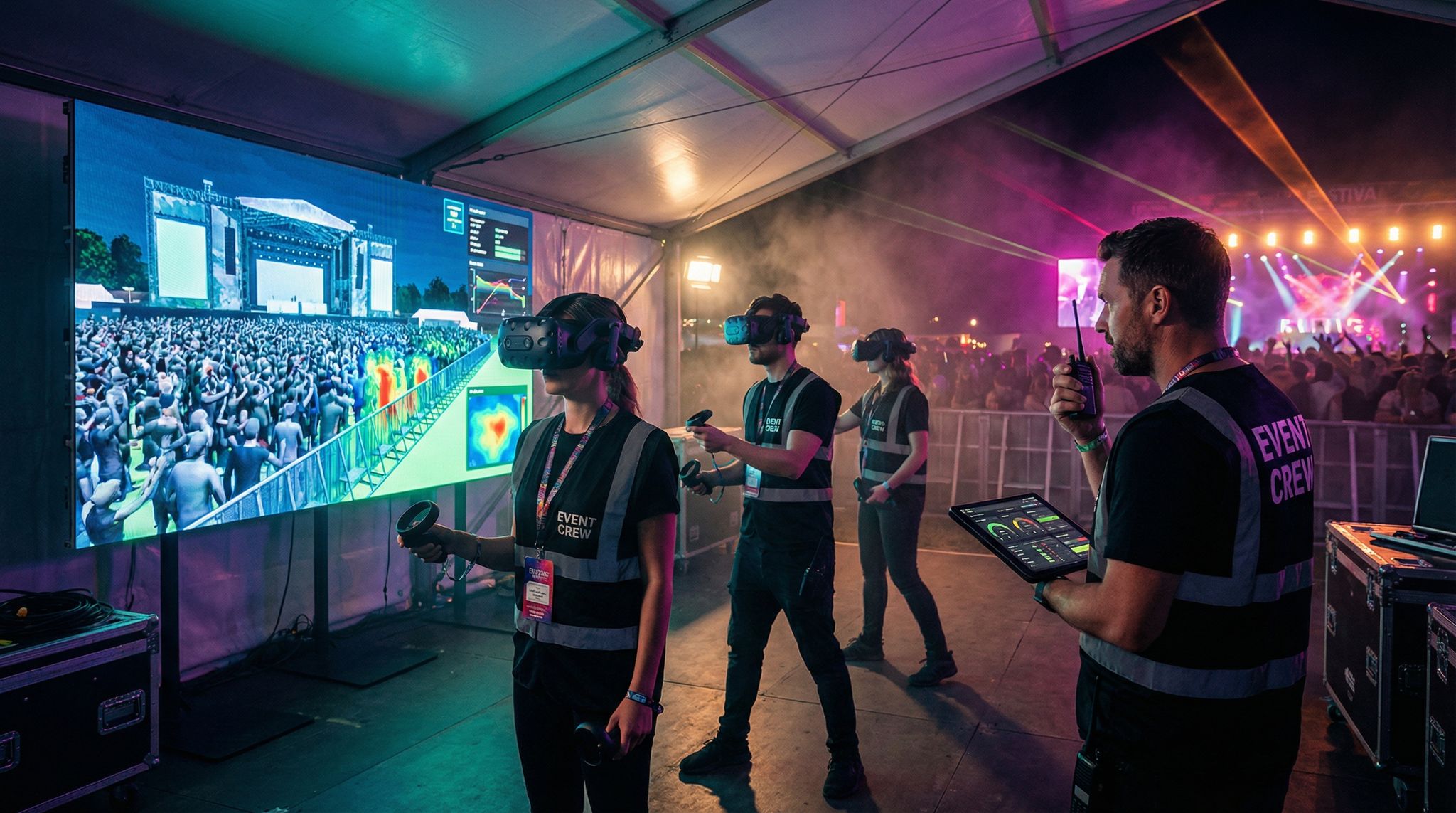
Perhaps the most exciting trend in event crew training is the rise of immersive learning technologies – namely Virtual Reality (VR) and Augmented Reality (AR) simulations. While still emerging, some forward-thinking festivals and venues have begun to pilot VR/AR training to give staff a realistic practice run in a safe environment. Imagine: instead of just reading the evacuation plan, volunteers can don VR headsets and go through a virtual crowd evacuation scenario, learning how to direct attendees to exits during a simulated crisis. It sounds futuristic, but it’s happening. In fact, immersive training for event staff is being called the “new frontier” of crew management, improving team safety, confidence, and consistency, with early adopters reporting improvements in team readiness and confidence.
VR technology lets trainees experience a 3D festival or venue environment as if they were there. For example, festivals have built VR “site tours” where volunteers can virtually walk through the grounds before they arrive on-site, a method used to revolutionize festival crew training and representing the new frontier of immersive tech. They can explore the layout, see where the stages, entrances, and key facilities are, and even encounter virtual attendees asking for help – all from the comfort of a training room. This level of familiarity dramatically reduces the learning curve when the real event begins; a volunteer isn’t seeing everything for the first time while on duty. One pioneering program created a virtual crowd surge drill – volunteers in VR had to respond to an expanding “crowd” pressing against a barricade, learning how to communicate and alleviate pressure points. Others have used AR mobile apps to assist in on-site training; for instance, holding up a phone at an empty field and seeing an overlay that labels “Stage A”, “Food Court”, “First Aid” so volunteers can visualize where everything will be once the event is set up.
Studies show that people learn and retain skills much better by doing than by passively listening, as immersive tech allows for training in realistic environments. Immersive simulations leverage that by letting crew actually practice scenarios that are hard to rehearse in real life. A volunteer can virtually go through the motions of operating a fire extinguisher, guiding a lost child to the info booth, or executing a stage changeover, which builds muscle memory and confidence. According to a notable University of Maryland study, VR-trained individuals had over 90% recall of their training, versus around 78% recall for those who trained via traditional computer slides – a nearly 12% improvement in retention, proving that virtual reality training is better for retention. That can translate directly into quicker reaction times and fewer mistakes on the ground. Early feedback is promising: events using VR training have reported more confident staff, faster onboarding, and improved safety records as teams feel better prepared to handle situations, ensuring every team member gets training.
Of course, immersive tech isn’t mainstream for every event yet, due largely to cost and complexity. High-quality VR headsets and custom simulations require investment, so we mostly see this at larger organizations or those with specific high-stakes training needs. But as the hardware gets cheaper and software becomes more modular, this could trickle down. Some companies are already offering “VR training kits” for event safety that mid-sized venues can rent. For example, a VR module might walk a security volunteer through a realistic crowd evacuation, letting them make decisions and then giving feedback on their actions – all in 15 minutes at an all-hands training session. And AR doesn’t require expensive gear at all; a smartphone-based AR guide for how to assemble stage truss or how to check an ID could be developed fairly easily and shared with your crew.
The bottom line is that technology is enriching the training experience for event staff. Whether it’s through interactive online modules or cutting-edge VR drills, volunteers and staff can now learn by doing, as opposed to being lectured at. This not only boosts their competence but also their enthusiasm – training becomes more engaging than a dry orientation packet. One festival manager noted that their trial of VR training had an unexpected perk: volunteers thought it was fun! It became a team-building activity in itself, which created buzz and higher volunteer retention for the next year. While not every event will have VR headsets in 2026, the principle stands: embracing new training tech and methods helps ensure your team is ready for anything. And when volunteers feel well-prepared, they carry themselves with a professional confidence that elevates the whole attendee experience.
(Experience from veteran organizers underscores that technology alone isn’t enough – it must be paired with a culture of support. For instance, inclusive onboarding practices are crucial so that every new team member, regardless of background or ability, feels welcome and prepared, ensuring new hires get a comprehensive welcome. The best results come when modern tools and human-centric management go hand in hand.)
Real-Time Communication and Coordination
Mobile Apps and Digital Team Hubs
When an event is live, real-time communication with staff and volunteers is absolutely critical. In the past, organizers relied on morning briefing sheets and walkie-talkies to disseminate information. Those still have their place, but the communication game in 2026 has been seriously upgraded by mobile and cloud technologies. Now, many events use dedicated crew communication apps or team hubs to keep everyone connected. These can range from features within an all-in-one volunteer platform (e.g. an in-app chat for volunteers) to repurposed general tools like Slack, Microsoft Teams, or Discord.
For instance, it’s common to set up channels in Slack or Discord for various volunteer teams – #ushers, #merch-booth, #medical, etc. – so targeted messages can go to the right group instantly, helping to maintain clear communication. A volunteer can pull out their phone and see a push notification announcing, “Weather alert: thunderstorm expected at 3pm, all outdoor volunteers report to HQ for ponchos.” If someone has a question (“Has the 4pm speaker arrived yet?”), they can ask in the appropriate channel and get an answer from a coordinator in seconds, rather than running around to find a supervisor. During the 2026 Comic-Con, for example, organizers set up a private Discord server for their hundreds of volunteers, enabling a constant two-way flow of updates and questions. Volunteers used it to coordinate badge line management in real time – when one entrance got backed up, a lead could ask in the chat for extra hands, and nearby volunteers would see the request and respond immediately, all via their phones.
Even for smaller teams, these group messaging solutions beat long email threads or clunky SMS blasts. They create a sense of community and shared purpose among staff – you’ll see volunteers sharing quick tips (“Water is running low at Station A, someone please restock”) or encouraging each other (“Great job handling that rush, team!”) which boosts morale. Many platforms also allow pinning important info (like site maps or emergency procedures) in the chat, so anyone can quickly reference them on the go. It’s like having a living operations manual in everyone’s pocket.
Some events opt for purpose-built volunteer coordination apps provided by event tech vendors. These often combine scheduling and comms. For example, a volunteer logs into the app to see their shifts and there’s a message inbox for announcements from organizers. One advantage of using an integrated app is that you can target communications based on the schedule. If Crew Member A is assigned to parking duty, the system can send them an alert only relevant to the parking team (“Lot C is full—start directing cars to Lot D”). If an entry gate’s staffing changes, the app can notify just those working that gate. This level of targeting keeps information relevant and avoids spamming everyone with everything. It’s also trackable – organizers can usually see read receipts or confirmation that volunteers received an important message.
Next-Gen Radios and Push-to-Talk
While mobile apps are fantastic, good old two-way radios (walkie-talkies) remain a backbone of live event comms – but even they are getting a 2026 upgrade. Many events now use digital radio systems that offer clearer signal, wider range, and encryption. These systems often integrate with headsets and earpieces that are more discreet and comfortable, so crew can communicate hands-free while working. For instance, security teams or volunteer leads might wear modern push-to-talk earpieces that connect to a radio hub, allowing them to chat without holding a handset. The clarity and reduced interference of digital radios (and the ability to have more channels) help ensure urgent messages don’t get lost in static.
In addition, smartphone-based push-to-talk apps have come on the scene as a supplement to physical radios. Apps like Zello or Teams Walkie-Talkie mode can turn a smartphone into a walkie-talkie with unlimited range (as long as there’s internet connectivity). Some festivals encourage volunteers to install a push-to-talk app as a backup communication method, especially useful for extended sites where not everyone has a radio. For example, a volunteer out in the parking lot far from the main radio signal might use the app to instantly reach the parking coordinator. These apps can enable voice messages to a group at the touch of a button, simulating the radio channel experience but through cellular/Wi-Fi networks. During one large 2025 music festival, organizers set up a push-to-talk channel for all team leads and found it effective to coordinate across a sprawling site – when weather caused an evacuation, even volunteers who were off-shift at the campgrounds got the alert via the app and helped spread the word to attendees.
The choice between traditional radios and new app-based voice comms often comes down to reliability and context. Radios are robust (no cell network needed) and instantaneous with a dedicated device – essential for high-criticality roles like security, stage management, etc. Mobile push-to-talk is flexible and cheap (no additional hardware) and works well for less critical or geographically dispersed coordination. Many events do both: a core team on physical radios and a broader team connected via an app. What’s important is that everyone knows how to use the tool and proper radio etiquette. Here, training is key – volunteers should know the basics like using clear text (“10-4” for acknowledgment, etc., if using any codes) or simply how to speak succinctly on a channel. Some events include a short radio demo in orientation or have cheat-cards with common phrases.
Another advancement in on-site comms is dedicated communication infrastructures at venues. Big venues and festivals now often deploy private Wi-Fi or mesh networks so that their crew apps and devices stay connected even if public cell networks get overwhelmed by attendees. For instance, Coachella builds a temporary LTE network each year just for staff and vendors to ensure their devices (scanners, tablets, radios over IP) remain online. This means volunteers using a communication app or cloud-based schedule can still function even when 50,000 fans are Snapchatting on the public network. It’s a behind-the-scenes tech investment that pays off in reliable comms.
Instant Alerts and Emergency Comms
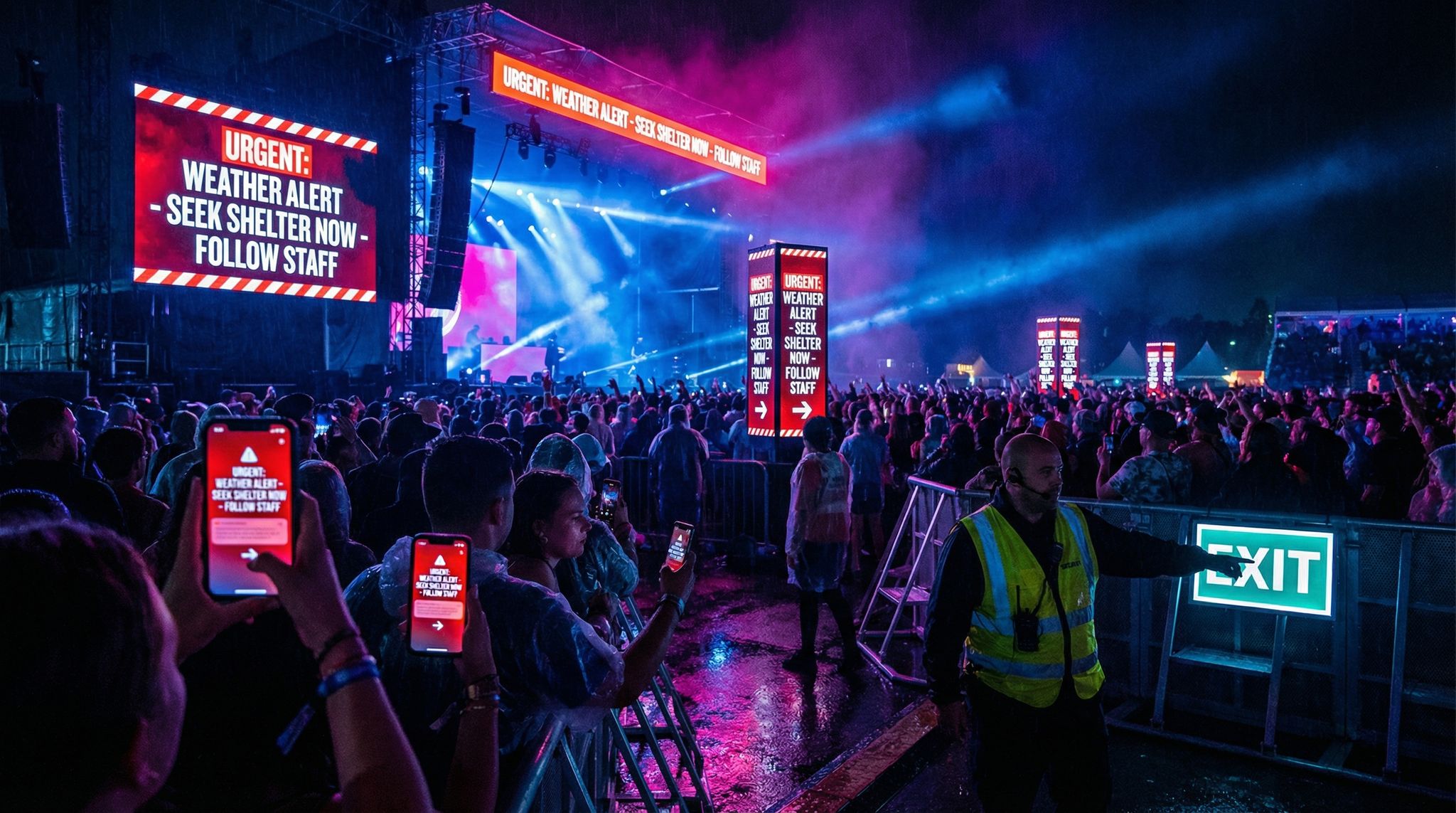
Beyond routine communications, technology greatly improves how fast organizers can reach everyone in case of urgent news. Most volunteer management systems now include a broadcast alert feature: a way to send a one-way message to all staff/volunteers (or a specific subgroup) instantly. This is typically used for things like emergency announcements, major schedule changes, or critical reminders. A coordinator can craft a short alert – “Lightning storm approaching, all outdoor operations pause and seek shelter now” – and with one click push it as a text message, email, and app notification to the entire crew. Within seconds, hundreds of personnel receive the warning. Compare that to older methods of calling tree branches or trying to find each team lead by radio to relay the message, which can take many minutes – time you might not have in an emergency.
Real events have proven the value of these instant alert systems. A fan convention in 2026 credits their staff SMS alert system with preventing injuries during an unexpected venue power outage – staff were notified to calmly halt attendee entry and assist in evacuation, all within 30 seconds of the outage. Another example: at a large EDM festival, a major schedule change (a headliner’s set time moved up an hour) was communicated to every volunteer via push notification, ensuring all teams (stages, crowd control, etc.) adjusted in sync. Attendees might never know how close these events came to confusion, because the crew stayed coordinated.
For less urgent but important updates, bulk messaging tools save loads of time. If the meetup time for volunteer check-in changes the night before, an organizer can send one message through the platform to all 250 volunteers with the updated instructions. No individual texting or hoping they see an email – the system logs that the message was sent and in some cases even who opened it. Some platforms allow volunteers to respond (i.e., two-way messaging) which can be useful for RSVP-ing or asking follow-ups (“Yes, got it” or “I can’t make the new time”). Others keep it one-way for simplicity.
It’s also worth noting how communications tech aids inter-department coordination. Modern event control rooms might have a digital dashboard showing the status of various teams at a glance, fed by the tools those teams use. For example, if volunteers use a check-in app, the ops center could see in real-time “98% of volunteers checked in today” and specifically that the ticket scanning team is fully staffed but the parking team has 2 no-shows. They could then proactively radio the volunteer manager to redistribute staff or send an alert for extra help in parking. That kind of visibility across the whole operation is a game-changer for making informed decisions on the fly. It essentially turns individual team communications into operational intelligence for the event directors.
At the volunteer team level, communication tech fosters accountability and community. Features like read-receipts or status indicators can show who has acknowledged an assignment or seen the latest update. Some events publicly display volunteer engagement metrics (like who has completed all their training modules or who has perfect attendance) on a team leaderboard – a gentle gamification that encourages everyone to stay on top of comms and duties. And after the event, those same channels can be used to share thank-yous, post-event surveys, and even keep the community warm for the next event (many volunteer programs maintain year-round Facebook or Discord groups to retain their core base).
In summary, effective communication technology ensures no volunteer or staff is ever “out of the loop”. Whether it’s routine shift info or a critical safety warning, the message gets where it needs to go immediately, helping to ensure everyone sees updates immediately. This kind of cohesion was hard to imagine in the days of clipboards and nightly debriefs. Now, with smartphones in nearly every pocket and user-friendly apps, even a widely dispersed team can function like a synchronized unit. Attendees may never directly see this communications web, but they feel it in the form of short lines, quick responses to issues, and an overall smooth experience – all signs that the staff is coordinated in real time.
Integration with Event Systems and Data Insights
Linking Staffing with Ticketing and Access Control
Modern events run on an ecosystem of tech systems – ticketing, entry access control, cashless payments, event apps, CRMs, and more. A huge benefit of contemporary staff management tools is their ability to integrate into this ecosystem rather than stand apart. In 2026, integration is king: no tool should operate in isolation, because connected systems yield real-time insights and eliminate data double-handling, so organizers should look for documented API availability and treat integration capability as a requirement. For staff and volunteer management, this means your scheduling platform can share data with other event systems to streamline operations end-to-end.
One practical example is credential and badge integration. If you’re using an RFID wristband or digital badge system for entry, you can tie volunteer credentials into it. Many ticketing platforms (including Ticket Fairy’s) now offer the ability to create staff/volunteer passes with specific access levels. By integrating your volunteer database with the ticketing system, you can automatically issue each volunteer a digital pass or RFID wristband that’s pre-authorized for the zones and days they’ll be working. This saves a ton of time compared to manually uploading volunteer names into the access control system. At large festivals, volunteers typically get special wristbands – integration ensures those are activated only for the right areas (e.g., staff lounge, backstage if applicable) and times. It also means when a volunteer scans in at the gate, the system recognizes them as crew and logs their check-in as both a security measure and an attendance record for your hours tracking.
On-site check-in integration is another boon. Instead of separate processes where volunteers sign in on a paper and attendees scan tickets elsewhere, some events integrate volunteer check-in with the main entry system. For instance, a volunteer might simply scan their attendee-style QR code at a crew check-in kiosk, which simultaneously marks them as present in the volunteer management system and prints their staff badge or meal coupons. Real events have done this: conventions have leveraged their attendee registration software to also check in volunteers at a dedicated station, using the same technology (just different badge credentials). This reduces duplication and lets organizers monitor in real time which volunteers have arrived – data that can feed into dynamic reassignments if someone is late or absent.
Data flow between systems also helps eliminate silos. Imagine during the event you want to tally how many staff and volunteers are currently deployed versus how many ticketed attendees are on site. If your systems talk to each other, you could see a live dashboard: “15,000 attendees checked in, 300 volunteers on duty (95% of today’s roster)”. If that volunteer number looks low, you know to possibly pull some standby folks or alert department leads. Another integration might be between the volunteer platform and incident management software. If your security team logs an incident (say a medical call) in a system, an integrated volunteer system could automatically ping any nearby volunteers with first-aid training to assist until the medics arrive. This kind of cross-system orchestration is cutting-edge, but certainly feasible with open APIs and creative developers.
Perhaps the most common integration for volunteer management is with CRM or database systems that track all people involved in an event. Many festivals and conferences maintain a CRM that includes attendees, vendors, staff, etc. Having volunteer info flow into that (and vice versa) means you maintain a holistic view of your community. For instance, you could identify that some top volunteers are also big spenders on merchandise or are VIP attendees from past years – useful insight for engagement strategies. Or if an attendee registers interest in volunteering via the event website, that info can flow straight into the volunteer recruitment module, avoiding any manual re-entry.
Open APIs (Application Programming Interfaces) are what make these integrations possible. When evaluating any event tech, integration capability should be a first-class requirement, not an afterthought, so verify that your volunteer management solution offers an API. As an organizer, it pays to verify that your volunteer management solution offers a well-documented API or pre-built connectors to major platforms. Many leading systems boast a long list of integration partners precisely to make this easy – for example, they might plug-and-play with popular ticketing systems, email marketing tools, accounting software (for reimbursing volunteer expenses), etc. If not, a good export/import function at least lets you manually sync data if needed. The goal is data cohesion: your various tools should share relevant data so you’re not constantly copy-pasting or reconciling spreadsheets between them. In 2026, disconnected systems are a recipe for chaos, whereas connected ones unlock efficiencies – like ticket sales instantly reflecting in staffing needs, or volunteer survey feedback automatically compiling alongside attendee feedback for a full event report, achieving a high level of data cohesion.
Ensuring Security and Compliance
With great data integration comes great responsibility – particularly regarding security and privacy. Managing staff and volunteer information means you’re handling personal data (names, contact info, perhaps even IDs or background check data) and possibly sensitive info like medical conditions or dietary needs if volunteers have disclosed them. It’s vital that any technology used to store this data follows strong security protocols. This includes encryption, access controls, and compliance with regulations like GDPR for events in Europe or similar data protection laws elsewhere, ensuring compliance with regulations like GDPR and treating security rather than a tech novelty. Reputable volunteer management platforms will offer features like role-based access (so, for example, only the volunteer coordinator and HR team can see everyone’s full profile, whereas team leads might only see the names and emergency contacts of the volunteers they supervise). They’ll also have secure password policies and often 2-factor authentication to prevent unauthorized access.
Another compliance aspect is PCI and payments if your volunteer system collects any fees or deposits. Some events implement a volunteer deposit system – e.g. a music festival might charge volunteers $100 upfront that’s refunded after they complete all shifts (to discourage no-shows). If using such a system, you need to ensure the platform processes payments securely and is PCI-compliant. The good news is many event registration or staffing systems use the same payment processing backend as ticketing, which usually meets high security standards. Just be sure to vet this; you don’t want to be storing credit card numbers in a spreadsheet (a big no-no!). It’s often smarter to integrate with your main ticketing platform to handle any volunteer payments or refunds, rather than reinvent the wheel.
From a labor compliance perspective, integrations can actually help you enforce rules. For example, if volunteers are limited to working 8 hours a day by regulation, your scheduling tool can be configured not to exceed that. Time clock integrations (e.g. volunteers clocking in/out via an app or RFID tap) can create an audit trail of hours worked, which protects both the volunteer and the organizer by documenting that no one was overworked or improperly compensated if stipends are offered. Some systems will even alert you if a volunteer is approaching a threshold of hours that might legally tip them into “employee” territory. For instance, certain jurisdictions say if someone works X hours in a quasi-employee role, you must pay them – the software can flag those scenarios so you can take action (perhaps by rewarding that person or rotating them out to keep things fair and legal), adhering to minimum wage laws and compliance and navigating the fine line between volunteer and employee.
Finally, consider data retention and permissions. Volunteer programs often involve collecting waivers, emergency contact info, maybe t-shirt sizes, etc. An integrated system can timestamp when someone agreed to a waiver or allow volunteers themselves to log in and update their information. This self-service aspect is great – it not only reduces admin work but also puts some control in the hands of the volunteers (which is good for trust and accuracy of data). Just ensure you have a plan for purging or anonymizing data when it’s no longer needed, in line with privacy best practices. For example, you might delete personal info of volunteers who haven’t returned in 3 years, or remove health info after the event ends if it was only needed during the event. Top platforms are starting to include these data lifecycle management features because organizers are demanding them.
In summary, integration of your staff management tech with the rest of your event systems offers huge upside – but it needs to be done securely and thoughtfully. When all systems talk to each other, you get a holistic, real-time picture of your event operations, and you eliminate the busywork of double-entry and siloed information. You also reduce errors: the more one system knows about another (like volunteer schedules feeding into your overall production schedule), the less likely something important slips through the cracks. The key is to choose tools that play well with others and to always keep data privacy and security in focus while reaping the benefits of that connected data. If you do, your staff and volunteer management process becomes not just an isolated workflow but a seamlessly integrated part of the entire event machine.
Preventing No-Show Crises and Ensuring Reliability
Automated Reminders and Confirmations
One of the perennial nightmares for event organizers is a volunteer no-show crisis – that sinking feeling when an entire info booth team fails to turn up, or half your gate staff vanishes right when doors open. Technology can’t eliminate human flaky-ness entirely (life happens!), but it’s proving very effective at dramatically reducing no-shows. A straightforward yet powerful tool is the automated reminder. Modern volunteer platforms will send volunteers periodic reminders leading up to the event and even require active confirmations. For example, a month out, volunteers might get a “We’re excited to see you! Please reconfirm your availability” email; a week out they receive their personalized schedule again via email and SMS; and the night before or morning of, an app notification might ping them: “Reminder: your shift starts in 2 hours – see you at Gate 4!” These multi-channel nudges ensure that volunteering stays on people’s radar, and if someone’s plans changed, you find out before you’re counting on them at 7AM Saturday. In fact, many purpose-built scheduling platforms let volunteers confirm or decline shifts in advance, so you have a more accurate roster. Some even integrate with calendar apps – a volunteer can add their shifts to Google Calendar with one click, reducing the chance they forget.
The data shows this works. Clear, early communication and reminders are cited as the number one factor in volunteer attendance. A volunteer who has received multiple confirmations is far more likely to show up than one who signed up months ago and never heard anything since. By keeping volunteers engaged and informed (and maybe a little accountable via those confirmations), you significantly shrink the no-show rate.
Standby Pools and Waitlist Automation
No matter how well you communicate, a few people will inevitably drop out last minute – illness, emergency, or the dreaded “overslept my alarm.” Smart events plan for this by maintaining a standby pool of extra volunteers and using tech tools to deploy them as needed. As mentioned earlier, many organizers aim to recruit 10–15% more than needed. These are often folks who are eager to help and happy to jump in where needed, even if not assigned a fixed role initially. With a good management system, you can label these folks as “floaters” or “standbys” and even rank them by who should be called first.
Here’s where automation shines: rather than the volunteer manager manually ringing up backups at 5:30am, the system can send out a broadcast message to all available standby volunteers the moment a gap is identified. For example, if by 15 minutes into shift start, John hasn’t checked in for his ticket scanning shift, the software can automatically mark his slot as unfilled and trigger an alert to the standby pool: “Position open at Main Gate, 9am–12pm – click here to accept.” The first person to respond gets assigned and is told where to report. Some platforms even have this built-in as a “waitlist” feature – volunteers who didn’t get their first-choice shifts can opt-in to be on standby, and the system will auto-invite them if a slot opens. This kind of instant fill mechanism has prevented countless on-site staffing crises.
Another tactic is overlapping shifts as a buffer. Scheduling software makes it easy to, say, have the morning shift end at 1:30 and the afternoon shift start at 1:00, creating a 30-minute overlap. That way if the afternoon people are late or missing, the morning folks are still there for a bit to cover. While this might cost a little extra in volunteer hours or stipends, it greatly cushions against gaps. Many events do this for key roles like registration, where coverage is critical. The scheduling tool can highlight these overlaps and ensure volunteers understand the expectation (some might wonder why they need to come 30 minutes early – you can note it’s for pass-down and coverage purposes).
Data-driven scheduling also helps anticipate where no-shows are most likely. For instance, perhaps historically the Sunday 7am teardown crew has a 30% no-show rate (not surprising, it’s early morning after a long weekend). If you know that from your analytics, you can proactively assign more volunteers to that shift or mark more as required, expecting a portion to flake. As one volunteer management blog noted, tracking attendance by shift lets you identify those high-risk slots like early mornings or last-day cleanup. With that insight, you might over-schedule by 20% for those shifts or offer special incentives (like free coffee & donuts for the 7am crew) to boost turnout.
In some cases, events employ a deposit or incentive system to secure commitment. Technology simplifies administering this fairly. For example, an event might require volunteers to put down a $50 deposit via credit card when they sign up, which is automatically refunded in the system after they complete all their shifts. Or conversely, some events promise a juicy reward (like a full refund of the festival ticket or a merchandise package) if all assigned shifts are completed. The volunteer platform can log hours and flag who qualifies for the reward, then even trigger an automated email: “Congrats and thank you – you’ve earned a free ticket to next year’s event!” Caution is needed with punitive measures – you don’t want to breed resentment or punish people with legitimate excuses – but when done right, these approaches significantly cut down no-shows by attaching a tangible consequence to flaking. It turns volunteering into more of a commitment, which most serious volunteers understand and respect, especially if they know they can come in if texted last minute.
It’s also important to foster a sense of responsibility and community to discourage no-shows. Technology helps here indirectly: by using the communication and engagement tools discussed, volunteers feel more connected and accountable to the team. It’s harder psychologically to bail on a shift when you’ve been chatting with your team lead all week on Slack and you know they’re counting on you, as opposed to when you’ve heard nothing since signing up. Some events even publicly acknowledge perfect attendance or create friendly competition (e.g., showing which volunteer team had the best attendance record). This positive reinforcement, tracked and facilitated by software, can motivate volunteers to show up and do their part.
Despite all measures, a few no-shows will still slip through – but with good tech, you’ll know immediately and can react. Volunteer coordinators now monitor attendance dashboards during the event, which show in real time who has checked in for each shift. If 5 out of 5 needed people are green-lighted for the 10am shift, great. If it’s 10:05 and only 3 of 5 are checked in, the coordinator can instantly activate backups for those 2 missing bodies, as described. This is a far cry from older days when you might not realize someone didn’t report to their post until a problem occurred. By integrating check-in scans or apps, you have a live pulse on your crew’s status. It allows you to be proactive instead of reactive.
Incentives, Recognition and Retention
Preventing no-shows isn’t only about sticks (deposits) – it’s also about carrots. Keeping volunteers motivated and committed is an ongoing effort, and technology can assist in recognizing and rewarding your team. Many volunteer management platforms let you track hours or shifts completed, and even tie that to reward levels. For example, after a volunteer completes 5 shifts, the system could automatically email them a voucher for a free meal at the event, or after 10 shifts, a discount code for merchandise. Some systems have built-in gamification, with points and badges volunteers earn for various contributions, using built-in gamification. It might sound gimmicky, but a “Volunteer MVP” badge awarded in the app can actually spark friendly competition and pride. At the very least, having the data handy (who did what) lets organizers give credit where due – maybe a shout-out in the post-event newsletter to the volunteers who covered extra shifts last-minute or an “All-Star Volunteer Team” highlight on social media.
Volunteer mobile apps often include feedback and rating features too. Volunteers can rate their experience or specific shifts, and coordinators can privately rate volunteers’ performance (some platforms allow this as a notes field or score). Using this data wisely can improve reliability: you might identify a pattern that certain volunteers frequently cancel or arrive late, allowing you to address it or schedule them in less critical roles. Alternatively, you spot your rockstar volunteers and can groom them for lead positions or offer them first pick of shifts as a perk. One convention organizer noted that after implementing a volunteer management system, they could track volunteer retention year over year and saw a big uptick – by rewarding top contributors with things like early access to next year’s volunteer sign-ups (so they get preferred roles), their return rate improved, further reducing last-minute no-show problems because they built a core of dedicated, reliable people.
Another incentive to boost reliability is creating a pathway for volunteers to grow. Some events use their systems to identify volunteers who might want to move into paid staff roles eventually, or who have valuable skills. For example, through tracking and feedback, you notice a volunteer who is excellent at social media or tech – next event, you might bring them onto the core team in that capacity. Communicating these opportunities (even informally) can motivate volunteers to take their commitment seriously. They see that showing up and doing well could lead to more involvement or even a job. This taps into the intrinsic motivation of many volunteers: they’re often young people eager to gain experience or passionate fans who dream of working in the industry. By treating volunteer management strategically – enabled by data and communication tech – you turn volunteering into a two-way street of value, rather than a one-off free labor situation. This mindset yields more dedicated and responsible volunteers, who are far less likely to ghost you on event day.
In summary, the technology and tactics to prevent no-shows revolve around keeping volunteers engaged, informed, and valued from start to finish. Automated reminders ensure they don’t forget or “oops” their commitment; waitlist and standby systems catch the ones who do drop out; and a culture of accountability and appreciation, reinforced by data-driven rewards, makes volunteers want to honor their promise. By 2026, events that implement these strategies and tools often see their volunteer no-show rates drop dramatically – by 30–40% or more in some cases. That’s not just less stress for organizers; it translates to a smoother operation and a better experience for attendees, who might never realize anything was ever at risk of going awry behind the scenes.
Scaling from Small Meetings to Massive Festivals
Right-Sizing Your Tools for the Event
Staff and volunteer management technology isn’t one-size-fits-all. The needs of a 50-person community theater show differ greatly from a 150,000-attendee festival. One of the most important considerations for organizers is choosing and scaling the right tools for their event’s size and complexity. Small events (say a conference with 10 volunteers or a club show with a handful of staff) can often get by with very simple solutions – sometimes even a shared Google Sheet or a free signup tool is sufficient, as simple solutions like Google Sheets can work for small teams. The key is not to over-engineer: if you have a tight-knit team of 15 volunteers, putting everyone in a WhatsApp group and using a basic online spreadsheet for shift sign-ups might be perfectly effective. Many small events succeed with these DIY methods, especially if the team is experienced and communication lines are short. The old adage “if it ain’t broke, don’t fix it” applies; a small nonprofit run by volunteers might not need to pay for a robust platform when a consistent email thread still works for them.
However, as soon as you start growing, the manual approach shows its cracks. Midsize events – perhaps a festival with 100 volunteers or a conference with multiple tracks and 50 staff – benefit from moving to dedicated volunteer management software to handle the increased coordination load. These tools prevent chaos as the number of schedules and people multiply. They also free up the volunteer coordinator (who at small scale might wear 5 other hats) to focus on people rather than paperwork. A major pain point for midsize events is ensuring nothing falls through the cracks during busy moments, and tech is excellent at this (automatic reminders, conflict checking, etc., which we discussed). It’s at this scale that self-service shift selection, online training modules, and group messaging start becoming indispensable versus “nice-to-have.”
For large-scale events, such as city-wide festivals, major conventions, or sporting events, an enterprise-level solution is virtually mandatory. When you’re dealing with several hundred to thousands of volunteers and staff, the management platform becomes your command center. Large events often have multiple departments (e.g., Operations, Guest Services, Logistics, Stage Crew, etc.) each with their own sub-teams of volunteers. In these cases, you’ll want a system that supports tiered access and hierarchy – so each department lead can manage their team’s shifts, but upper management has oversight of everything. It’s also where integration with other systems (as covered above) is most beneficial due to the event’s complexity. For example, Expo 2020 Dubai famously had ~30,000 volunteers, and they used a sophisticated platform (Rosterfy) that handled everything from application screening to training and scheduling at that massive scale, having successfully facilitated Expo 2020 Dubai and improving the experience for those visiting Doha. Closer to 2026, events like the upcoming Expo 2023 Doha saw 50,000+ volunteer applications flow through an integrated portal in just a few days, managing 50,000 volunteer applications in 3 days – something simply impossible to manage without a highly scalable tech solution. These enterprise systems come with robust infrastructure to ensure reliability (you can’t afford a system crash when thousands of volunteers try to check their schedule) and features like multilingual interfaces for international events, complex reporting, and advanced analytics.
Here’s a quick overview of matching event scale to solutions:
| Approach / Tool Level | Example Tools & Methods | Best For |
|---|---|---|
| DIY & Manual (Ultra-simple) | Spreadsheet rosters, group texts/WhatsApp, phone calls | Very small events (handful of staff/volunteers), informal local events where everyone knows each other. |
| Basic Online Sign-ups | Google Forms/Sheets, SignUpGenius (free tier), Doodle polls | Small events (dozens of volunteers) needing a central sign-up without complex shift logistics. Low budget scenarios. |
| Specialized Volunteer Software | VolunteerLocal, SignUpGenius (premium), Shiftboard, Volgistics, Timecounts | Medium events (50–500 volunteers) or any event with defined shifts and roles. Offers scheduling automation, reminders, hour tracking. |
| Enterprise Workforce Systems | Rosterfy, VolunteerHub, Golden, bespoke in-house system | Large-scale events (500+ volunteers or multi-department teams). Ideal for festivals, expos, large conventions, sporting events with thousands of staff/volunteers. Highly scalable, integration-rich, with advanced analytics and support. |
(Note: The tools mentioned above each have unique strengths – for instance, VolunteerLocal is known for advanced shift scheduling suited to music festivals, while Volgistics offers deep customization for volunteer programs. The right choice depends on the event’s specific needs. Some events even opt to build custom systems when off-the-shelf can’t meet their niche requirements, but building has its own costs and is usually only pursued if absolutely necessary, considering that building has its own costs and relying on native integrations vs roadmap.)
The goal is to scale your processes, not just your people. As your event grows, the management tech should grow with it. Many events learn this the hard way: what worked for 20 volunteers breaks down at 200. The transition might involve some trial and error – maybe you adopt a mid-tier platform and outgrow it, needing to migrate to an enterprise solution next year. The good news is today’s options are plentiful, and many are cloud-based services that can upgrade your plan as you scale, without needing to start over.
Adapting to Different Event Types
It’s not just size – the nature of the event also influences staff management needs. Festivals and concerts, for example, often have long multi-day schedules, outdoor conditions, and a need for real-time redeployments (due to weather, stage delays, etc.). They benefit from tools with strong mobile capabilities and on-the-fly scheduling changes. Festivals also commonly use volunteers for entry, info booths, and cleanup, which are roles that benefit from RFID integration (for entry) and robust communications (for coordination across a big site). We’ve seen music festivals integrate volunteer scheduling with their ticketing and RFID systems so that volunteer wristbands are active only during their shifts, doubling as both a credential and time-tracking device – a clever adaptation of tech to fit festival workflows.
Conferences and conventions, on the other hand, often take place in controlled indoor venues with more predictable schedules (e.g., sessions at set times, expo hall hours). Here the focus might be on training volunteers to handle information desks, speaker support, or registration efficiently. These events might value tools that integrate with registration/badge systems (to get people their badges swiftly, or to manage session room capacities). Additionally, conventions often have repeat volunteers year after year, especially fan-based cons where volunteering can be part of the culture. Managing a returning volunteer base (with things like accumulated experience or seniority for role selection) is something certain platforms facilitate well – they let you tag veterans vs newbies, for example, or easily rollover your database from last year’s event. A convention might use its volunteer system to open volunteer applications months in advance and integrate with their marketing to recruit from the fan community, leveraging the world’s largest fan conventions.
Sporting events (marathons, tournaments, etc.) might have very short, intense staffing needs (one big game day or race day) but with huge numbers of volunteers. For instance, a city marathon can require thousands of part-day volunteers (water station teams, course marshals, medical support). These benefit from systems that handle granular shift locations and volunteer check-in at spread-out points. GPS mapping integration can be a plus – showing volunteers where their checkpoint is. Also, for sports, ensuring all volunteers have signed liability waivers is a big concern; a system that can manage digital waiver signing and verification becomes important.
Trade shows and expos often involve volunteers helping with registration, info, and maybe conference sessions, but also a lot of paid temporary staff. These events might focus on integrating volunteer scheduling with overall staffing schedules, including contractors. They might also emphasize tracking hours closely if volunteers are earning perks or credits for their time.
Non-profit fundraisers and community events might prioritize cost-effective solutions (free or low-cost platforms) and user-friendliness, since the volunteers might be less tech-savvy or the coordinators themselves may be volunteers. Simplicity is key in these cases – a slightly less feature-rich but easy-to-use system could be better than an overkill enterprise solution.
The adaptability of technology is such that the same platform can often be configured for different event types; it’s usually a matter of setting the right parameters. For example, you might use the same volunteer software for a music festival and a conference, but you’ll use different features: for the festival, you lean on the SMS emergency alerts and map-based check-in; for the conference, you use the session assignment and speaker escort scheduling features. Experienced implementation specialists recommend doing a thorough requirements analysis based on your event type: list out what tasks volunteers do, what could go wrong, what needs tracking, etc., and then ensure the chosen tech addresses those. If it doesn’t, you might need a supplementary tool or a better-fitting platform.
One interesting trend is events borrowing practices from each other’s domains thanks to tech. For instance, conventions (inspired by festivals) started to use RFID badge scanning for crew to get real-time headcounts of volunteers on-site, and festivals (inspired by conferences) began implementing structured volunteer orientations and customer service training like conferences do. Technology facilitates this cross-pollination by making features available to all kinds of events. The result is a raising of the bar across the board: volunteers at a local arts festival might now get nearly the same level of coordination and training (through a mobile app and webinars) as volunteers at a large corporate conference – something that wasn’t practical a decade ago.
Command Structure and Leadership
As events scale, organizing the volunteer management team itself becomes crucial. A small event might have one person in charge of volunteers; a huge event might have an entire chain of command (volunteer manager, zone supervisors, team leaders, etc.). Technology is tremendously helpful in reinforcing this structure. Many volunteer platforms allow you to designate users with different admin roles – e.g., team leaders can update the schedule for their team, send messages to their group, and log issues. This decentralizes management in a controlled way. It’s almost impossible for one person to directly manage 500 volunteers during an event; but by breaking it into 10 teams of 50 with a leader on each, and giving those leaders the tech tools to coordinate their squads (while the central manager monitors overall), it becomes feasible. We saw this approach at large music festivals: a few staff members acted as “volunteer coordinators” for each major area (camping, gates, stages), and they used the system to communicate just with their subgroup while the head of volunteer operations oversaw everything from the command center. The tech ensured that any message from high-up trickled down to all volunteers, and any issue from the field bubbled up to the top, without overloading any single person with all communications.
For multi-day events, scheduling software also assists in implementing shifts and rotations that prevent burnout. Large events often have multiple waves of volunteers (e.g., one group works Thu/Fri, a second group works Sat/Sun) to distribute the workload. Managing those assignments manually is a nightmare – but the software can handle it, and volunteers can even preferences which days they want to work. Some conventions with thousands of volunteers split them into color-coded teams that work different days or times, and the system helps assign and label these accordingly. This structured approach keeps each volunteer’s commitment reasonable, which in turn increases the likelihood they’ll fulfill it.
Ultimately, scaling up successfully means maintaining the human touch even as numbers grow. Tech can automate and optimize, but volunteers still need to feel personally connected. Many large events use their platforms to personalize communications (“Dear John, we’re excited to have you on the Team Yellow – Security crew!”) and to keep track of volunteer interests so they place people in roles they’ll enjoy. For example, a volunteer database might note that Alice is a nursing student – so the system (and zone leader) assigns her to first aid tent duty, which she finds meaningful and is skilled at. That level of personal matching, done at scale, really only works with a robust database and a bit of AI or smarts in the assignment process. It pays off in volunteer satisfaction and performance, which scales the quality of your team along with the quantity.
In conclusion, whether you’re running a local fundraiser with a dozen helpers or a continental festival with an army of volunteers, there are tools and strategies tailored to your scenario. The key is to adopt appropriate technology at the right time: don’t drown a small team in unnecessary software, but don’t try to handhold a massive team without digital aid. As your event evolves, continually reassess: is our current system still efficient? If not, there’s likely a 2026 solution that fits. Scale brings complexity, but with the right tech, you can manage that complexity and turn it into an operational strength rather than a headache.
Impact on Attendee Experience and ROI
Smoother Operations, Shorter Lines
Attendees often judge an event by how smoothly everything feels – how long they waited to get in, how easy it was to get help, how organized things seemed. Behind those smooth operations are the staff and volunteers, and behind those staff is the technology that empowers them. When you deploy modern staff management tech, one immediate outcome is shorter queues and wait times for attendees. Why? Because you’re far more likely to have the right number of people in the right places at the right times. For instance, predictive scheduling might have told you to put extra ushers at the arena doors right after the keynote ends, preventing a bottleneck. Or real-time communications might have allowed you to quickly send a few volunteers to assist at a suddenly busy box office. The result: fans aren’t stuck in line for an hour missing the show, they’re through in 10 minutes and happy, having accommodated hundreds of attendees.
A concrete example can be seen in how conventions have nearly eliminated badge pickup lines by combining volunteer coordination with tech solutions, effectively eliminating badge pickup lines. At many 2026 fan conventions, volunteers now staff self-serve kiosks or mobile check-in teams that roam the line scanning QR codes, as opposed to the old model of one slow counter. These innovations, made possible by training volunteers on new systems and ensuring they’re properly scheduled, have dramatically sped up entry. According to one case study, a large expo that implemented an integrated reg system and retrained their volunteer greeters saw average attendee check-in time drop from 5 minutes to under 1 minute – virtually no lines at all, seeing a check-in time drop from 5 minutes and achieving virtually no lines at all. That kind of improvement directly enhances the attendee experience and makes your event more attractive in a competitive market.
Beyond entry, think about all the touchpoints: concession stands, info desks, merch tables, meet-and-greets. Properly managed staffing means adequate coverage at peak times, reducing those painful waits. One venue manager put it bluntly: “shorter lines equal more sales” – if fans aren’t stuck waiting forever for a beer or merch, they’re likely to spend more money (and leave happier), confirming that shorter lines equal more sales. In fact, in the hospitality industry, some studies show significant revenue bumps when wait times are cut, because customers don’t give up or leave. So by using tools to cut volunteer no-shows and strategically deploy staff (like opening another bar when an AI alert says the main one is slammed), you’re not only making attendees happy, you’re likely boosting ROI through higher sales and repeat business, especially when you dynamically reassign volunteer ushers.
Better Service and Engagement
Well-managed volunteers tend to be more confident and proactive, which directly translates to better service for attendees. When your team is trained (thanks to that online learning and orientation we discussed) and communicated with in real time, they can answer attendee questions accurately, handle issues swiftly, and even add special touches. For example, a volunteer who knows the schedule and layout by heart (because they had a great orientation and have the app for reference) will effortlessly guide a lost attendee to the right hall, possibly even sharing a tip about the event app on the way. Multiply that thousands of times, and you have an army of ambassadors creating positive interactions that attendees remember.
Volunteers often are the face of the event to attendees, as volunteers are the backbone. They’re the ones on the front lines – greeting guests, solving minor problems, providing information. If those volunteers feel supported and in control (because the scheduling is clear, they’re not overwhelmed due to understaffing, and they can call for backup if needed), they naturally deliver friendlier, more attentive service, reflecting the volunteers’ energy. We’ve all been to events where staff seemed harried or clueless – that’s usually a management issue, not a personal one. Conversely, when you see enthusiastic, well-informed volunteers at every turn, it’s a sign of strong behind-the-scenes coordination. Attendees pick up on this. They feel the event is “well-run” and will often comment on the great staff in post-event surveys.
From a marketing perspective, exceptional on-site service leads to better reviews and word-of-mouth. Attendees might not directly say “their volunteer management tech must be great,” but they’ll say things like “Lines moved quickly” or “Staff were super helpful and friendly,” which are direct outcomes of the systems you put in place. In a time when people often share their event experiences online, these positive comments are gold. They can drive ticket sales for future editions and increase loyalty – fans are more likely to return to an event where they felt taken care of.
There’s also a safety and comfort angle. A well-coordinated crew can prevent small issues from becoming big incidents, keeping the experience pleasant for everyone. For instance, if a crowd starts forming dangerously, volunteers (trained and connected via radio) can intervene early to disperse or manage it, ensuring positive volunteer interaction. If an attendee has an urgent need, any volunteer can quickly summon the right help thanks to their communication network. This proactive handling means attendees experience fewer disruptions or scary moments. They might not even realize how a potential problem was averted – and that’s a good thing. As the saying goes, the best event operations are invisible to attendees.
On the ROI front, consider volunteer retention. If your volunteers have a great experience (because you used tech to make their jobs easier and more rewarding), they’ll come back next time and bring friends, serving as smiling faces guiding crowds. This saves money on recruiting and training new people for each event. A stable, experienced volunteer base is like compound interest for event organizers – each year you invest in them with good management, and each year they give back more value. Some events have high volunteer return rates, which they achieve by treating volunteers like valued team members, ensuring they are treated with care. Technology aids this through consistent communication, recognition (like tracking hours and rewarding milestones), and building a community vibe online. One could argue volunteer satisfaction is an “ROI” of its own, as happy volunteers often become event evangelists, boosting the event’s reputation in the community.
Data-Driven Improvement and Revenue
In this age, data is often called the new oil. By managing staff and volunteers with modern tools, you automatically gather a lot of data – and that can be harnessed for continuous improvement and even new revenue opportunities. For example, you can analyze staffing vs attendee flow to optimize efficiency. Perhaps you find that from 2-4pm you had 20 volunteers idle because attendee traffic was low in their area – next time, you might reallocate those hours to a busier time or save the volunteer effort for other tasks. Or you notice that one info booth handled 300 inquiries a day while another only had 50 (maybe due to location) – you could consolidate or reposition volunteers accordingly. This kind of insight, gleaned from reports the system generates (like number of check-ins per station, volunteer utilization rates, etc.), helps you make evidence-based decisions rather than gut calls.
From a financial perspective, analysis might reveal where you’re overspending or underspending on labor. Perhaps overtime pay for staff was high on Day 1 because you understaffed and had to stretch people – fixable by scheduling more volunteers that day, which cost less. Or maybe you provided a catered lunch for 300 volunteers but only 250 showed up each day – you can adjust catering orders next time to reduce waste. These small optimizations add up to cost savings and better ROI on your event budget. The volunteer management system, combined with other data (like attendance stats, concession sales, etc.), can illuminate these correlations.
There’s also the angle of monetizing better experience. Happier attendees tend to spend more and return more. By smoothing operations and boosting service levels through excellent staff management, you likely increase attendee dwell time and satisfaction, which can translate to higher ancillary revenue (more F&B sales, merch, etc.). Some events have explicitly linked their improved volunteer program to revenue – for instance, when volunteers helped eliminate long bar lines, the event saw a notable uptick in drink sales simply because people weren’t discouraged by the wait. In another case, a theme park found that by having staff proactively manage and entertain queues, guest satisfaction rose, leading to better in-park spending and higher season pass renewal rates. For our context, think of a festival where volunteers roam with tablets selling drink tokens in the queue – an idea born from merging staffing with sales tech.
Finally, good staff tech can help with sponsorship and funding aspects. How? If you have a well-organized volunteer program, you can offer it as a sponsorship opportunity – for example, a company could sponsor the volunteer t-shirts or the volunteer lounge, because they know your volunteers are a substantial, visible group (this happens at some large events). You can present metrics from your system to potential sponsors like “Our 500 volunteers interacted with 20,000 attendees and were mentioned in 100 attendee feedback comments” to show value. Additionally, data on volunteer hours and community impact can be important if you seek grants or community support, since you can concretely demonstrate how many hours of service the event mobilized.
In essence, investing in staff & volunteer management tech is not just an operational decision, it’s a strategic one that creates a ripple effect of benefits. It ensures your event isn’t leaving money on the table due to inefficiency, it frees up your core team to focus on creative and revenue-driving tasks (since they’re spending less time firefighting logistics), and it often increases the intangible goodwill that can differentiate your event in a crowded market. At the end of the day, a well-managed team leads to well-served attendees, and well-served attendees become repeat customers and ambassadors for your event – the ultimate ROI.
Frequently Asked Questions
How does AI improve event staff scheduling?
AI-assisted rostering optimizes crew assignments by analyzing historical data and real-time inputs like ticket sales to predict crowd surges. These algorithms match volunteers to tasks based on skills and forecasted demand, reducing overtime costs and ensuring critical areas like entry gates remain fully staffed during peak times.
What are effective ways to reduce volunteer no-shows at events?
Organizers can significantly lower no-show rates by using automated multi-channel reminders via email and SMS apps. Maintaining a standby pool of floater volunteers allows for instant gap-filling through automated alerts, while requiring active shift confirmations or small refundable deposits helps ensure commitment and accountability among the crew.
How is VR technology used for event staff training?
Virtual Reality (VR) enables immersive training where staff practice scenarios like crowd evacuations or site tours in a simulated environment. This active learning approach improves muscle memory and confidence, with studies showing VR training can result in over 90% recall compared to traditional methods, ensuring better on-site readiness.
What tools are best for real-time event crew communication?
Modern events utilize dedicated mobile apps and digital team hubs like Slack or Discord to send instant push notifications and targeted updates. For urgent coordination, digital radios and smartphone-based push-to-talk apps allow organizers to broadcast emergency alerts or redeploy staff immediately, ensuring everyone stays connected across large venues.
Why should volunteer management software integrate with ticketing systems?
Integrating staffing platforms with ticketing and access control systems streamlines operations by automatically issuing digital credentials or RFID wristbands based on assigned shifts. This connectivity eliminates data silos, allows for real-time attendance tracking via scanning, and enables organizers to monitor staffing levels against attendee flow for dynamic adjustments.
How does staff management technology affect attendee experience?
Efficient staff management technology directly reduces queue times and improves service quality by ensuring the right number of trained personnel are deployed at peak times. Automated scheduling and real-time redeployment prevent bottlenecks at entry gates and concession stands, leading to higher attendee satisfaction and increased revenue from shorter wait times.